Audit AI Expense Categories Before Bookkeeping Import
An AI label is a suggestion, not a verified accounting entry. Check the receipt, sign, business purpose and exception queue before changing your books.
Quick answer: verify the transaction before its category
If AI software has assigned accounting categories to a batch of expenses, do not import the file directly into your bookkeeping system. First confirm that each row represents a real transaction, that its amount and sign match the source, that its evidence is available, and that the suggested category is appropriate under the business's chart of accounts and accounting method. Some rows should remain unresolved for a bookkeeper or accountant rather than being automatically categorized.
This is a practical pre-import quality-control workflow, not a guide to deciding which expenses are deductible on a tax return. The U.S. Internal Revenue Service explains that business records should show income and expenses and be supported by documents such as invoices, receipts and statements. An AI-generated description or polished ledger label does not replace those records. See the IRS recordkeeping guidance for the official framework, and consult a qualified accounting or tax professional for decisions that depend on the entity, transaction or jurisdiction.
Lynara's AI spreadsheet review guide addresses general spreadsheet mistakes. This article is narrower: building a verified exception queue for AI-proposed expense categories, preserving audit evidence and preventing an unreviewed file from changing business records.
Freeze a source copy and define the approved category list
Begin with a trusted export from the business's authorized bank, payment provider or bookkeeping system, and keep it separate from the AI-proposed output. Preserve its original column names, timestamps, IDs, amounts and currency. Make a working copy for review. Do not edit the source file merely to make it resemble the AI output. If you later uncover a mismatch, the unchanged source becomes the reference for reconstructing what happened.
Choose the exact chart of accounts already used by your business and, where appropriate, approved by the responsible bookkeeper. A label such as 'miscellaneous' can hide several different accounting treatments. An assistant should propose only values from an authorized list; it should never invent a new chart-of-accounts code because the transaction description sounds similar. If the available evidence does not establish the intended category, assign a status of needs human review.
The source records must have enough identifying information to match an expense with its documentation. A row may contain a stable transaction identifier, date, merchant or payee, amount, currency, account and reference to a supporting document. Never add private details solely for the sake of AI classification. If a service provider would receive sensitive financial information, review the company's authorization, confidentiality and retention requirements before uploading anything. You can practice the entire workflow with fictional data and without granting any AI tool access to real books.
Our AI vendor approval checklist helps structure that separate permission decision. It cannot certify a particular vendor or authorize disclosure of client records. For a first test, use invented transactions and manually review the suggestions.
Five checks every proposed expense row must pass
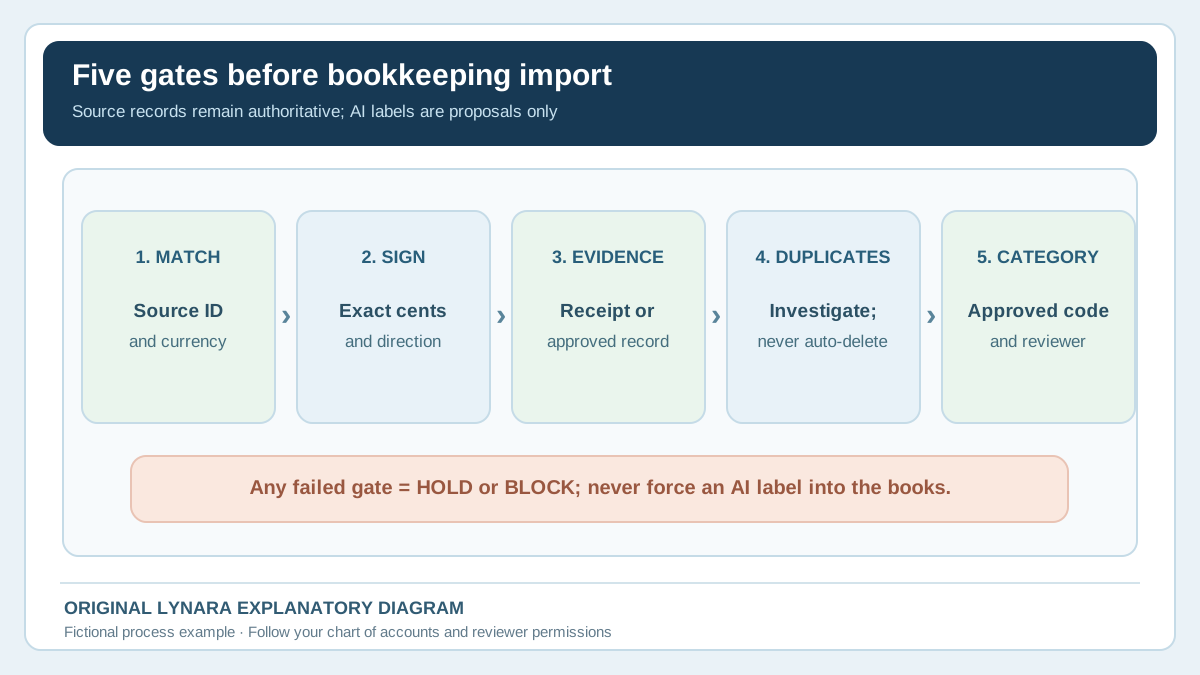
Design the review so that a reviewer can make the same decision consistently for each row. A category should be the final check, not the first. The five controls below work as a practical gate; a failure in one area should block import until it is resolved.
- Identity. Can the row be matched to exactly one authorized source transaction or approved journal entry? Keep the source identifier and verify the merchant, date and currency.
- Amount and direction. Does a charge, refund, supplier credit or reversal retain its correct sign and exact cents? Never replace a negative amount with a positive expense because the text mentions a purchase.
- Supporting evidence. Is there an invoice, receipt, card record or other suitable source showing what the business purchased and why? Mark missing or contradictory evidence for follow-up.
- Duplicate and timing checks. Could the same transaction have arrived twice from a bank feed and an uploaded invoice, or could two legitimate similar charges merely share a merchant and amount? Flag candidates, but never delete them based on a fuzzy match alone.
- Category and reviewer authorization. Does the proposed label match the approved chart of accounts and the actual nature of the transaction? Does it require specialist treatment for an asset, inventory, reimbursement, tax, personal use or mixed-use item?
A row that passes the mechanical checks can still need professional judgment. Buying a laptop, for example, does not automatically mean the correct treatment is the same as pens or shipping labels, regardless of how confident an AI model sounds. The business's actual accounting rules and evidence determine the entry. Do not use these examples to make tax deductions or depreciation elections without appropriate review.
Practical tip: record the reason an AI category was rejected, not just the replacement label. 'Reviewed by staff' provides little evidence on its own. 'Laptop purchase referred to accountant for asset treatment; invoice attached' makes the review traceable without pretending to settle the accounting question.
Worked example: a $50 sign error in five fictional rows
Consider a fictional small business preparing to import five transactions. The suggested expense-category file was generated by an AI tool from synthetic merchant descriptions. All amounts are in U.S. dollars and were invented for this exercise. The objective is to test reconciliation, not recommend tax treatment for a real business.
| ID | Source amount | AI suggestion | Review decision |
|---|---|---|---|
| T01 | $49.00 | Software subscription | Evidence matched; category subject to approved chart |
| T02 | $1,250.00 | Office supplies | Hold: laptop may require asset-specific review |
| T03 | −$25.00 | +$25.00 supplies expense | Block: supplier credit sign is wrong |
| T04 | $84.25 | Packing materials | Evidence matched; verify account code |
| T05 | $120.00 | Travel expense | Hold: supporting business purpose unclear |
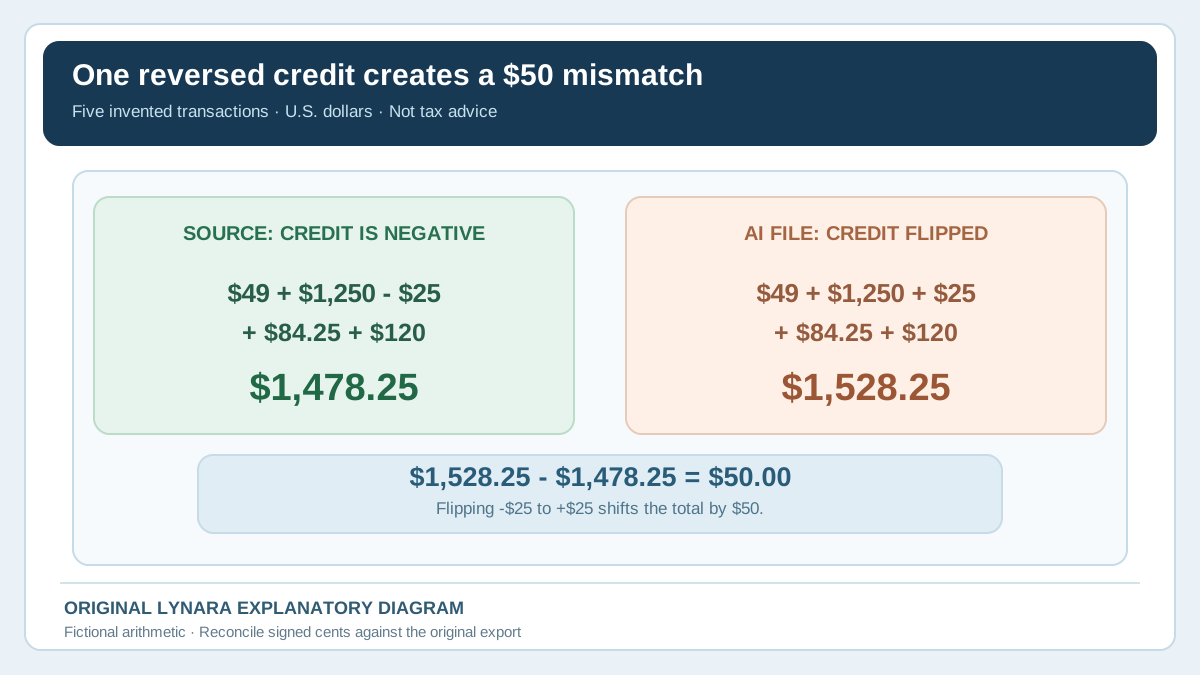
The source ledger's signed sum is $49.00 + $1,250.00 − $25.00 + $84.25 + $120.00 = $1,478.25. An AI file that wrongly turns the $25 supplier credit into a positive expense instead totals $49.00 + $1,250.00 + $25.00 + $84.25 + $120.00 = $1,528.25. The mismatch is $50.00, not $25.00, because the change from −25 to +25 shifts the total by 50. Simply checking whether all five rows have a category would not catch this.
The amount check resolves only one failure. T02 and T05 remain on hold until an authorized reviewer examines supporting facts and the company's policies. T01 and T04 may pass after the approved source and chart of accounts are verified. We cannot conclude from the merchant words alone whether any amount is deductible, capitalized or allocated in a particular way. The most useful output is an accurate exception queue, not a forced list of five finished labels.
You can reproduce the signed total in a spreadsheet with =SUM(B2:B6) if column B contains numeric amounts with T03 entered as -25, not text such as $25 refund. Confirm the result against the source export. Do not silently strip minus signs, replace decimal separators incorrectly or convert currencies without an explicit and verified conversion policy.
Build an exception queue without importing private data into an unapproved tool
The review sheet can be local. Use fields for source transaction ID, date, merchant identifier, amount, currency, proposed category, approved account code, evidence status, duplicate status, reviewer, decision and reason. Keep a small set of status values: not reviewed, pass for authorized import, hold for evidence, hold for accounting decision and duplicate candidate. A record is not import-ready just because every field is nonempty.
For duplicate detection, begin with stable identifiers. If a provider assigns a unique transaction ID, compare that ID rather than relying solely on merchant and amount. Two separate $49 monthly charges from the same software provider can be legitimate. Conversely, the same charge can be represented by both an uploaded receipt and a banking feed with different IDs. Group likely matches for inspection; never automatically delete financial records based on text similarity.
Lynara's Research CSV Quality Checker can help check structural problems in a local CSV file, such as missing values or columns, when the file fits that tool's documented input format. It is not an accounting validator; it does not verify receipts, business purpose, tax treatment or bank balances. Do not upload sensitive ledger data merely because a page calls itself a file checker. Test with synthetic examples first and choose an approved local workflow for real records.
Keep the actual documents in your authorized business system. The IRS guidance on supporting records describes the kinds of receipts, invoices, paid bills and statements that can substantiate bookkeeping entries. A machine-assigned label and an AI-generated summary do not replace those records, and a spreadsheet created for a tutorial should not be confused with a financial system of record.
Use three independent reconciliations before pressing Import
A reviewer should compare counts, signed values and exceptions. The row count confirms whether all expected source transactions are represented. The signed total checks that amounts and credit directions survived transformation. The exception status prevents ambiguous rows from being treated as approved entries. All three checks matter: a file can have the correct total while hiding two offsetting errors, or have the correct number of rows while containing a duplicated expense and a missing credit.
| Check | Question | Block condition |
|---|---|---|
| Row identity | Does every approved input map to the expected source item? | Unexplained missing or duplicated ID |
| Signed amount | Do cents and debit/credit directions match the source? | Difference not explained and approved |
| Unresolved cases | Are holds excluded from the proposed import? | A hold is marked as final |
| Accounts | Does each final code exist in the approved chart? | Invented or retired account code |
| Evidence trail | Can the reviewer locate supporting documents? | Missing required support |
Do not make the mistake of reconciling only the AI file to itself. If an AI output contains the same duplicated data twice, its own row count and category percentages may still look consistent. Compare it against an independent authorized source. When the source includes taxes, refunds, tips, multi-currency transactions or split payments, determine how those appear in the real books before trying to match totals. A simple tutorial cannot define your company's journal-entry structure.
For a pilot, use a blank or sandbox ledger rather than your production books. Check the target software's mapping and reversal procedure with your accounting team. Importing an otherwise clean CSV under the wrong account mapping can create a new set of errors. Keep a record of who approved the exact file version, when the test was done and how it would be rolled back.
Decide whether to release a subset or hold the batch
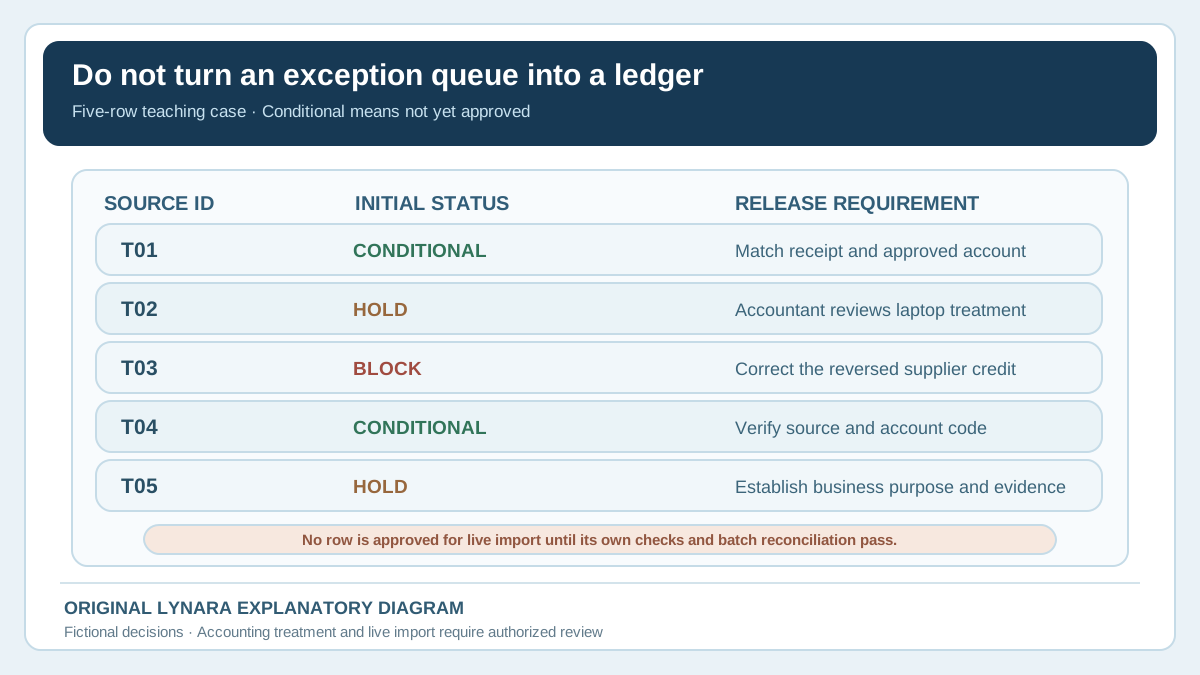
In the five-row teaching example, T01 and T04 are only conditional candidates: neither is cleared until a person confirms the evidence and final account code. T02 and T05 are on hold, and T03 is blocked by the wrong credit sign. Therefore the initial import-ready count is zero, not two or five. If the business permits a partial import after resolving T01 and T04, create a separately approved two-row file and reconcile its IDs and signed total to the same two source records. Never compare a two-row approved subset with the five-row source total and call the difference an error.
Record the approved file name or hash, source snapshot, row IDs, reviewer, approval time, destination mapping and rollback procedure. Keep held records out of that file and track them in a separate queue. A later correction should be reconciled to its original transaction, not silently appended as a second expense. These steps are internal controls for a hypothetical workflow, not instructions to post a particular accounting entry.
Measure whether AI assistance actually saves work
AI classification can speed up the first suggested label while adding verification and correction time. A useful business comparison includes preparation, drafting, review, rework and exception escalation. Suppose a fictional pilot has 100 low-risk synthetic rows. Manual categorization takes two minutes per row, or 200 minutes total. The AI-assisted route takes 30 minutes to prepare the permitted dataset, 20 minutes to obtain suggestions, 90 minutes for staff review and 45 minutes to resolve flagged cases. The total is 185 minutes, so the hypothetical net saving is 15 minutes for that batch. This does not include subscription fees, error remediation or compliance costs.
The calculation deliberately shows a modest result because automating the visible drafting step may not eliminate the expensive decisions. If the AI generates more serious errors, the workflow can become slower or unacceptable. If you have genuinely measured a safe pilot with verified time and cost inputs, Lynara's Business AI ROI Calculator can explore financial scenarios. It does not assess correct account classification or grant permission to process financial records.
Compare like with like: the same transaction types, a similar mix of ambiguous and straightforward cases, and an equally stringent human review standard. Do not omit difficult rows from the AI batch to make its speed look better. Keep a separate count of serious errors caught before import and incidents discovered after import. If a provider, prompt, category set or source format changes, repeat the relevant tests rather than assuming prior results still apply.
Frequently asked questions
Can AI decide whether a business expense is tax deductible?
Do not treat its category suggestion as a tax conclusion. Deductibility depends on facts, applicable law, entity, accounting method and documentation. Keep the evidence and obtain appropriate accounting or tax advice for uncertain cases. This workflow verifies input quality and routes unresolved decisions to a qualified reviewer.
Should we import rows marked 'needs review' and correct them later?
A safer pilot blocks unresolved rows before live import. An unsupported category, wrong sign or missing record may make subsequent reports misleading. Follow the controls defined by your authorized accounting team and use a test environment to validate mappings and reversals before approving any live change.
Is matching bank totals enough to prove every expense category is correct?
No. Two opposite errors may cancel in the total, and a correct amount can be assigned to the wrong account or unsupported business purpose. Check transaction identity, evidence, category, sign and exceptions individually. Totals are a necessary control in many workflows, not a substitute for row-level review.
Can we paste real receipts into a public AI assistant?
Only if the company has established the necessary authority, data protection and provider controls for the intended processing. Real receipts can contain private names, addresses, account information and commercially sensitive details. Use invented data for initial experiments, and follow your organization’s approved procedures for any real material.
How do we detect duplicate expense entries?
Compare stable source identifiers first, then inspect plausible matches by date, merchant, amount and document reference. Similar descriptions alone do not prove duplication. Flag candidates for a human who can distinguish a second legitimate purchase from an accidental second import. Preserve the audit trail for corrected items.
The correct result is a verified import queue, not a confident label
A useful AI expense workflow makes uncertainty visible. Preserve source records, confirm transaction identity and signed amounts, match evidence, flag duplicates and refer ambiguous treatment to a responsible person. Only rows that pass the company's authorized checks should move toward the target system. The five-row example shows why a single reversed credit can alter totals by twice its absolute value, while other rows remain unresolved even after the arithmetic is fixed. Start with synthetic examples and a local review sheet, apply the AI Workflow Suitability Checker to the proposed data flow, and get the accounting team's approval before any actual import.
Primary references: IRS Recordkeeping; What Kind of Records Should I Keep?; IRS Publication 583. This article is educational and contains fictional calculations, not an accounting, tax or import authorization.