AI Meeting Notes and SOPs: Verified Owners and Decisions
Keep an approved record of decisions and instructions instead of turning a draft summary into company policy.
A meeting summary is not a decision record until someone checks it
Teams in small businesses spend time writing meeting notes, action items and standard operating procedures. AI tools can summarize recorded or typed discussions, but a confident summary may omit an objection, misattribute a decision or invent a deadline. The safe objective is a reviewable draft: someone who attended the meeting confirms the decisions, owners and due dates before the document becomes an official record. The ability to generate many bullet points does not mean a team has reached agreement. Start by defining what needs to be preserved, not by choosing a transcript provider from an advertisement.
Decide whether a meeting should be recorded at all
An AI note tool may require a transcript, microphone access or integration with a video meeting account. The organization must understand relevant consent, privacy, employee and client confidentiality requirements. Do not assume a general business subscription permits uploading all meeting audio. A meeting with sensitive customer data, HR discussion or legal advice may require stronger controls or a manual summary instead. When recording is permitted, communicate who can access it, where it is stored and how long it is retained. A summary generated from an unauthorized recording is not made acceptable by removing names later.
Write a simple meeting output specification
A practical format has six fields: meeting date, purpose, participants where approved, decisions, action items with named owners and due dates, and unresolved questions. If a participant did not accept a task, the summary should not silently assign one. Every action item can include a source note or a timestamp from the authorized record for later checking. Distinguish proposed ideas from decisions that were actually made. That distinction matters more than whether the tool writes the minutes in a friendly or formal style. An effective template makes uncertainty visible rather than polishing it away.
A hypothetical operational meeting
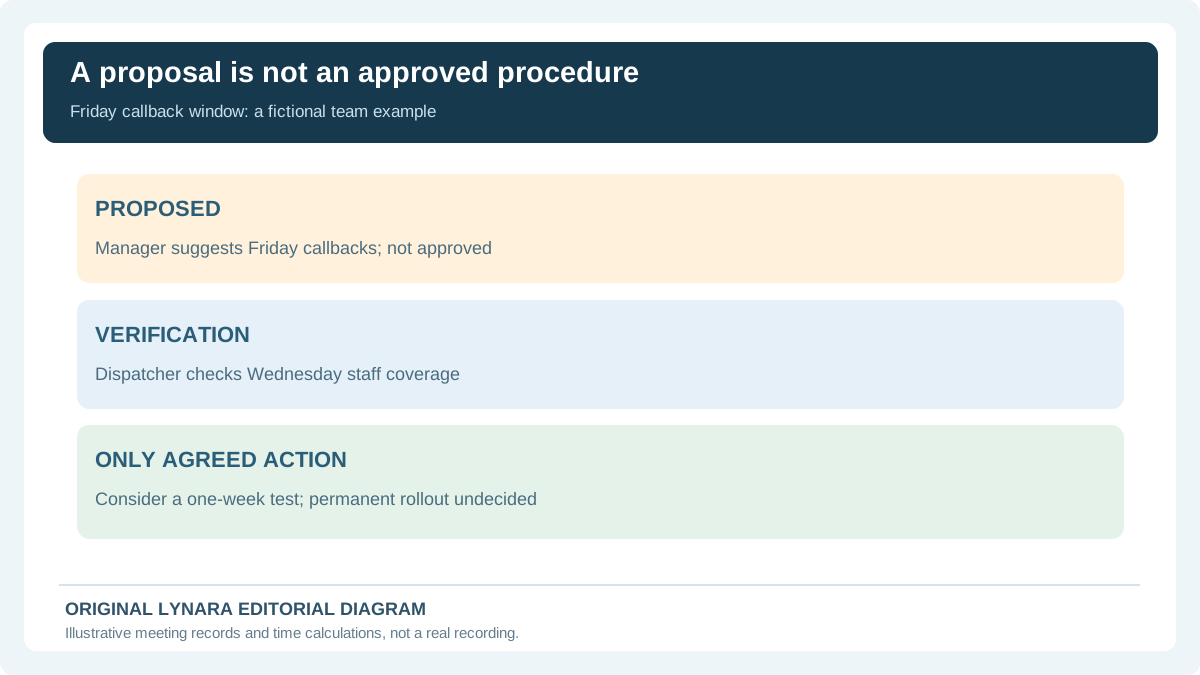
Imagine a fictional home-services company planning its monthly scheduling process. During a 20-minute conversation, a manager proposes a Friday callback window; a dispatcher says staff coverage must be checked; and the team agrees only to run a one-week coverage test. A careless AI summary might report: “Decision: introduce permanent Friday callbacks.” A responsible reviewed summary says: “Proposed Friday callback window; no permanent decision. Dispatcher will check staff coverage by Wednesday, then manager will decide whether to run the one-week test.” This is an invented example, not a transcript of a real team.
Review timestamps and omitted negation
Transcription systems can mistake “do not contact” for “do contact” or mishear a number. Before using an automatically drafted summary, check the source of high-impact statements, especially customer promises, price changes, account numbers, deadlines and people assigned work. For a school lecture, Lynara already offers a Transcript Correction Log; its local timestamped issue-recording idea can support an authorized business transcript too, but it does not listen to audio or repair it automatically. Do not claim the tool checks a recording it never received. Keep the original authorization and file-handling rules in force.
Turn repeated activities into an SOP
An SOP is a maintained set of instructions for a process, not merely a summary of what happened once. Start with an owner, a version date, purpose, trigger, required inputs, step sequence, exception handling and escalation contacts. For a fictional appointment reminder, steps might include verifying the current booking record in the approved system, selecting the correct message template, checking the intended recipient and logging the send. The SOP should not say an AI assistant “confirms bookings” unless an actual authorized integration performs that check. Each control should have a human who knows what to do when an input is unavailable.
Avoid documenting an invented best practice
Generative models can fill missing procedure details with plausible sounding instructions. In a regulated, hazardous or security-sensitive process, those fabricated steps could be dangerous. Ask the real process owner to demonstrate the procedure and verify each action before publishing the SOP. If no one can explain how a decision is approved or a customer identity is confirmed, mark it as an unresolved gap. The NIST AI Risk Management Framework provides voluntary principles for risk awareness and oversight; it is not a substitute for applicable safety standards, a legal opinion or a company's internal controls.
Measure the work before and after a tool
Meeting summaries appear free once AI transcribes an hour of speech, but a real work estimate includes preparing the meeting, obtaining authorized access, checking output, correcting errors and securing the document. An SOP also needs ongoing maintenance when responsibilities or systems change. To assess a recurring meeting workflow, enter weekly frequency, the original minute-writing time, the AI-assisted draft time and the review time in the AI ROI Calculator. Include subscription and training expenses instead of counting only the generated text. Results remain assumptions until the business runs a measured pilot.
Original numerical example: a review that erases the savings
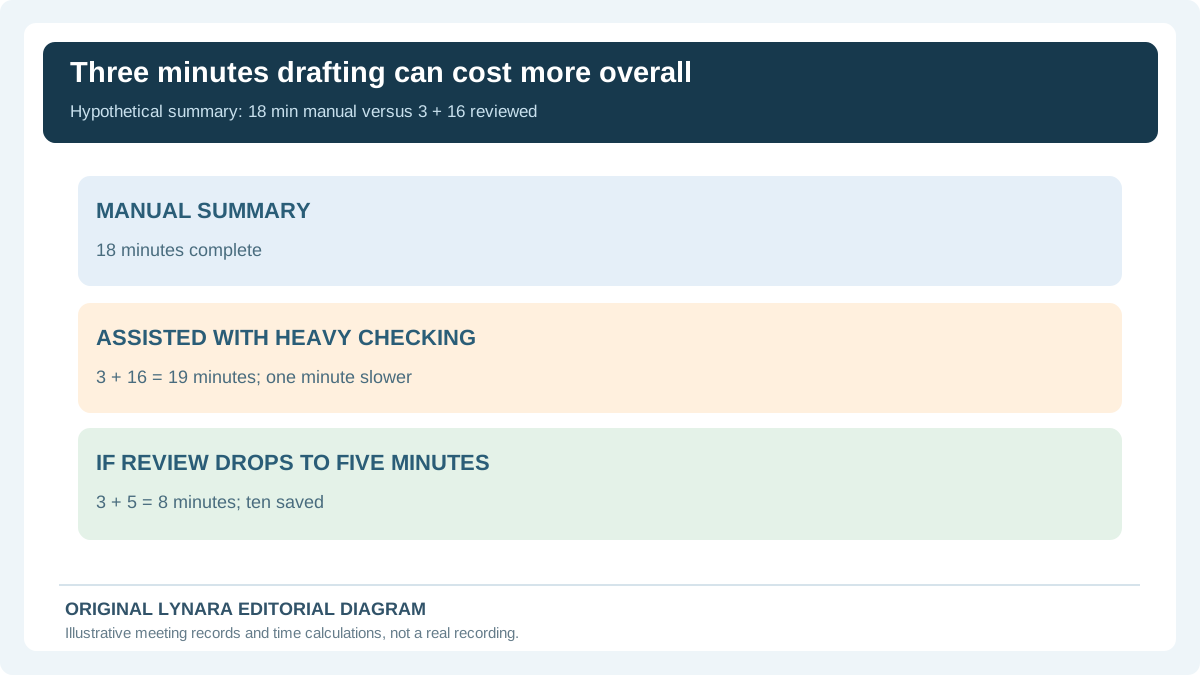
Suppose a fictional team manually writes a usable meeting summary in 18 minutes. An assistant makes a draft in three minutes, but a manager spends 16 minutes correcting attendees, owners and details. The assisted workflow requires 19 minutes and actually adds one minute per meeting. Across 12 meetings a month, that is an additional 12 minutes, before subscription costs. A superficial “AI saves 15 minutes” claim would be wrong because it ignored checking. If the team later improves the transcript quality so review takes five minutes instead, the real net change becomes 18 − 3 − 5 = ten minutes saved per meeting. The decision depends on measured review time.
Prevent silent changes to the official SOP
Every SOP change should identify the source of the proposed revision, the reviewer, the approval date and the current version. A tool should not overwrite the official procedure because someone pasted a new meeting transcript. Store a draft separately, highlight the exact change and require the designated owner to accept it. If two policies disagree, escalate the conflict rather than averaging their instructions. A single current source of truth with a revision history is more reliable than five superficially consistent AI summaries that copied the same original mistake.
Make meeting notes easy to follow
A useful summary names the precise next action, its owner and any confirmed deadline. Separate informational comments from commitments. When a task depends on another team, record the dependency instead of promising completion without their agreement. A reader who did not attend should be able to locate the source of each important decision. For people who use assistive technologies, preserve meaningful headings, structured lists and actual text rather than a flattened image or screenshot of the minutes. An accessible structure is also easier for a human to audit.
Keep sales and client promises from becoming fiction
A planning meeting might mention a possible client discount, product launch or capacity expansion without authorizing it. The minutes should identify such statements as proposals and avoid transferring them into a client-facing email as facts. Our customer-service AI email guide explains why outgoing communications need an approved policy source and a human escalation path. Drafting speed is not permission to make a commercial commitment. If a proposed change affects prices or contracts, the accountable person must review it through the ordinary approval process.
A seven-day SOP pilot
Day one: choose one non-sensitive, repeated internal meeting and confirm recording and data permissions. Day two: define the note template and owner. Day three: collect a baseline of manual documentation time. Day four: test the AI-assisted format with authorized content. Day five: record every correction and missing decision. Day six: verify action owners and teach the escalation path. Day seven: compare net time, corrections, access and costs. Only roll it out further if the evidence supports it. Use the business ROI planner to document the arithmetic, not to claim that a tool has been independently certified.
Check action owners before sharing meeting notes
Use the Meeting Action Item Checker to review stated owners, due dates and the decision source. The check runs locally and does not verify that an attendee actually accepted a commitment. Resolve missing fields with the people involved before publishing a team action log.
Explore related tools and guides in AI for Work & Business, including practical advice for freelancers, small businesses and office workers.
Decision-log quality: separate confirmed actions from proposals
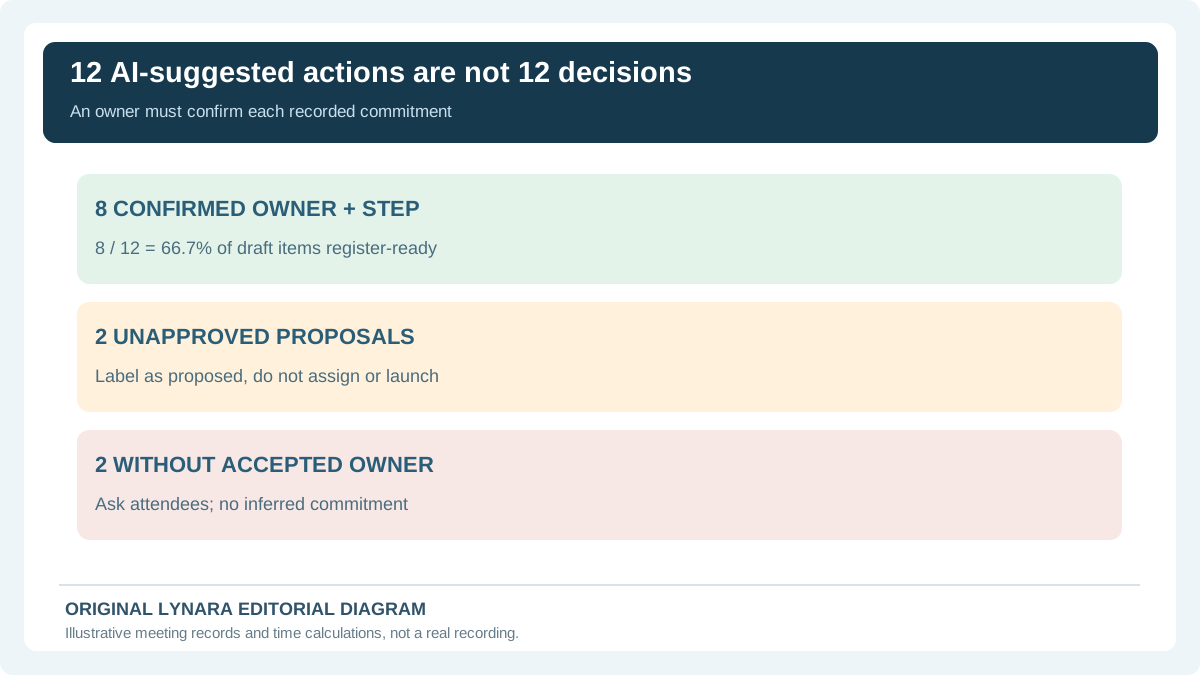
Suppose a fictional meeting-summary draft contains 12 apparent action items. A participant checks the authorized notes and confirms eight have an owner and an agreed next step. Two are merely proposals that nobody approved; another two name work but have no accepted owner. Only 8 / 12 = 66.7% of the draft items are ready for an action register. That is a reviewed-action share, not a task completion rate, an AI accuracy benchmark or evidence that eight jobs were finished.
| Classification | Count | Safe next step |
|---|---|---|
| Confirmed with owner | 8 | Check deadline and source, then record |
| Unapproved proposal | 2 | Keep under “proposed,” not “decided” |
| Owner missing | 2 | Ask meeting owner; do not assign by inference |
For every confirmed action, preserve a short source quotation or timestamp, the owner who accepted it, the due date if one was agreed, and a status that distinguishes “assigned” from “completed.” A screen-reader-friendly table with a caption and column headings is easier to audit than a screenshot of a spreadsheet. Lynara's Transcript Correction Log can inspire an issue-by-issue review, but it cannot listen to recordings or authenticate decisions. Use the Business AI ROI Calculator only after timing this human confirmation stage.
Use a decision register with evidence, not an AI-generated action list alone
In a fictional home-services team, a manager says Friday callbacks might improve scheduling. The dispatcher responds that staffing is uncertain, and the only agreed next step is to check coverage before a possible one-week trial. If a generated meeting summary announces 'Permanent Friday callback hours begin next week,' it has promoted a proposal to a company rule. That error could travel into a customer email or official operating procedure. A reviewer needs to compare the summary against authorized notes or an approved recording, then distinguish tentative ideas from decisions accepted by a named owner.
| Claim in generated minutes | Human evidence to check | Release decision |
|---|---|---|
| Launch Friday callbacks permanently | No final manager approval; only a suggestion | HOLD as proposed, not decided |
| Dispatcher reviews staffing | Dispatcher accepted the task for Wednesday | Record the owner and agreed checkpoint |
| Run one-week pilot | Manager will decide after coverage check | Pending; do not send customer notice |
| Publish updated SOP | No approved final SOP version exists | HOLD until designated approver signs off |
Source permissions and retention rules vary by jurisdiction and employment setting. The UK Information Commissioner's Office data sharing advice says organizations considering online meeting recordings should assess purpose and legal basis, tell attendees why recording occurs and how long information is kept, and consider whether ordinary written minutes would be less intrusive. It is UK guidance, not a universal rule or proof of permission to record in every U.S. state. For a U.S. business, obtain applicable legal, contractual and organizational approval before capturing voices or uploading recordings to a vendor. A tool that can summarize text does not imply authorization to process every meeting.
The existing twelve-item exercise remains useful: eight owner-confirmed actions represent 8/12 = 66.7% of draft items ready for an action register; two are only proposals, and two have no accepted owner. This proportion is not a task completion rate. Likewise, a correct summary isn't necessarily an authorized SOP. The versioned SOP must include an effective date, process owner, decision source, exception path and required sign-off. Only the real owner can approve the final procedure, and proposed edits should not silently overwrite the current operating instructions.
Human verification also changes the economics. If the complete manual summary takes 18 minutes but an AI draft takes 3 minutes plus 16 of checking, 19 minutes of assisted work is one minute slower, or twelve minutes extra across 12 meetings. If the actual reviewer can complete checks in five minutes, the total becomes eight and the potential benefit is ten minutes per meeting; this requires measurement of comparable meetings rather than assumptions. The Meeting Action Item Checker can help format the review, but cannot verify that the assigned person actually accepted their task.