AI Appointment Reminders Without Inventing Availability
A reminder should repeat the real booking, not turn a tentative time into a confirmed appointment.
What goes wrong with a perfectly polite reminder?
A neighborhood auto-detailing shop uses a shared calendar for bookings. One customer asks for Tuesday at 2 p.m., but the request is still waiting for confirmation. An AI assistant reads the conversation and drafts, “Looking forward to seeing you Tuesday at 2!” It sounds friendly and helpful. The problem is that the booking has not been accepted. If the customer turns up, the team may already be busy. A nicely written reminder has just created a service failure because its language outran the actual calendar state.
Many small teams can benefit from consistent reminder copy: salons, tutors, repair shops, photographers and appointment-based service businesses. Yet the right unit of work is not “send a message whenever somebody mentions a date.” It is “draft a reminder for a verified booking that the customer is entitled to receive.” This is a narrower task than our AI support FAQ guide. A FAQ explains approved, relatively stable policies; an appointment reminder reflects a live calendar record that could change minutes before sending.
Make the booking system the source of truth
Decide which software or record is authoritative for each appointment. A customer email thread may request a time, a staff calendar may show availability, and the booking system may show a different confirmed status. The reminder must use the approved record rather than choosing whichever message sounds most confident. Prepare a minimum dataset with booking ID, service or visit type, assigned location, confirmed start time, time zone, current status, authorized recipient channel and a safe link or contact method if the customer needs to change the booking.
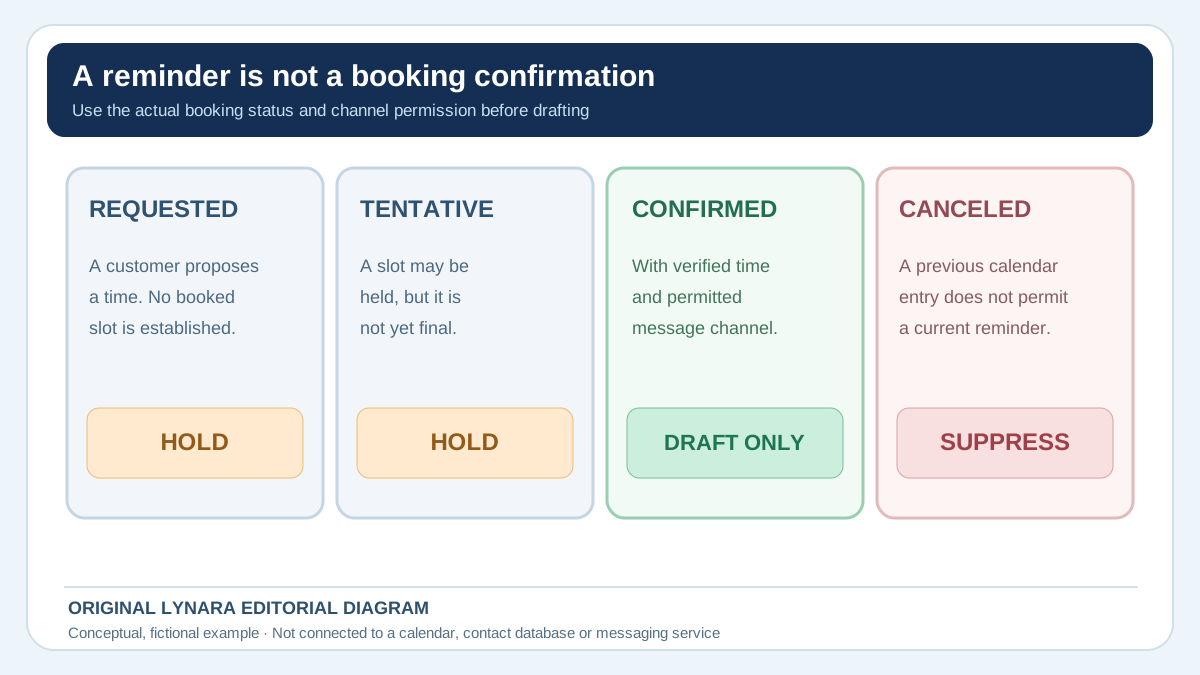
Differentiate requested, tentatively held, confirmed, rescheduled, canceled and completed. Only the statuses your business has approved for reminders should enter the send-ready queue. If an employee changes the schedule in the authoritative system, previously generated copy may already be stale. Use a snapshot timestamp and recheck the relevant record immediately before approval or dispatch. Do not give a language model permission to create appointments by interpreting natural-language conversations unless that action is separately designed, authorized and tested.
Time zones are business facts, not decorative details
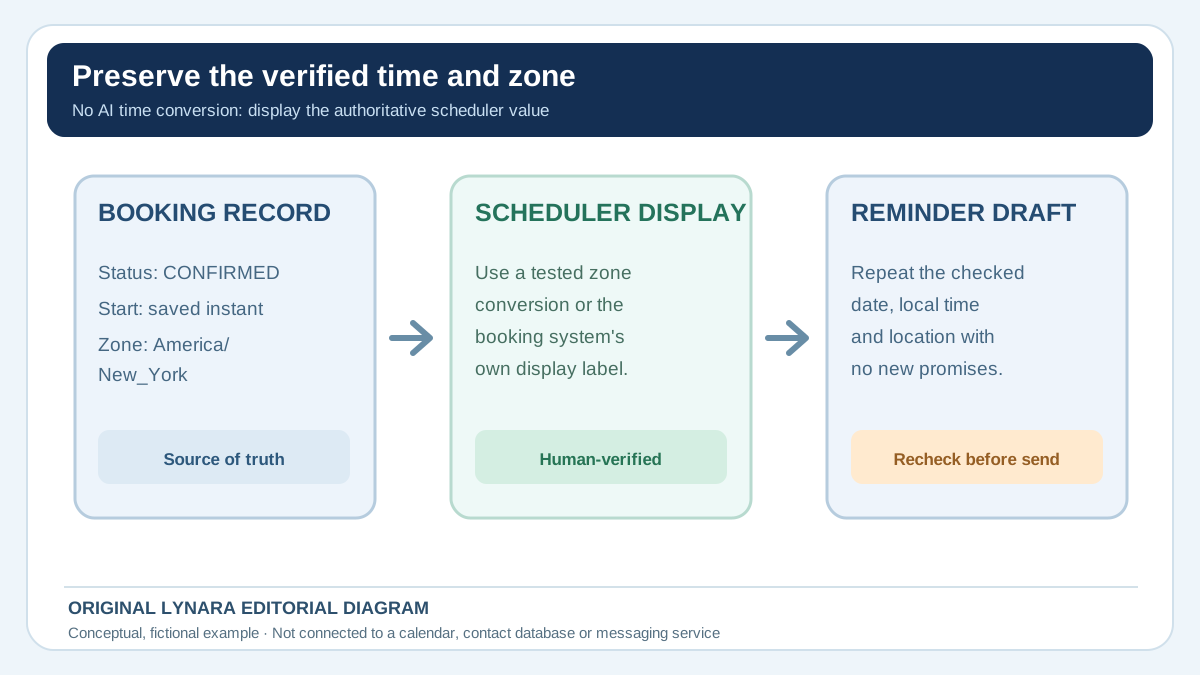
For a single-location shop, local time may seem obvious. The confusion starts when a remote assistant schedules on behalf of a business in another state, a customer travels or a meeting is virtual. Store a real time zone identifier in the booking system, not an ambiguous abbreviation copied into prose. When presenting a confirmed time to a customer, use the business's established convention and make any relevant zone clear. Do not let AI guess that a generic “EST” string means the same local offset during every month.
For example, a fictional remote consultation is confirmed for 3:00 p.m. New York local time. The client in another region should receive a booking display produced by the scheduling system, or a checked conversion, not an AI-generated guess. A model can write “Your appointment is scheduled for [verified display time]” and preserve the bracketed source field exactly. If the team cannot establish the correct customer-facing time with confidence, suppress the reminder until someone checks it. A wrong time is not a minor stylistic defect; it can create a missed appointment.
Separate reminders from new promotions
There is a meaningful difference between reminding someone about an already confirmed service and using that message to advertise another service. A reminder should stay focused on the booked visit and the practical details the customer needs. Do not let an AI system append unrelated discounts, product recommendations or “limited-time” offers simply because its default writing style favors marketing. Those additions can change the character of the communication and complicate applicable consent and messaging requirements.
Before using SMS, email or automated calls, check the recipient's permissions, channel preferences, opt-out requests and the rules that apply to that communication. US rules may distinguish automated marketing from certain informational messages, and state requirements can also matter. The FCC's consent-revocation rulemaking explains why businesses need a reliable process for honoring revocation requests in automated texting and calling contexts. This article does not determine which legal exemption, if any, applies to a particular message; obtain appropriate advice and configure the actual messaging provider accordingly. Human approval of copy alone is not a substitute for compliant sending infrastructure.
A fictional eight-appointment test
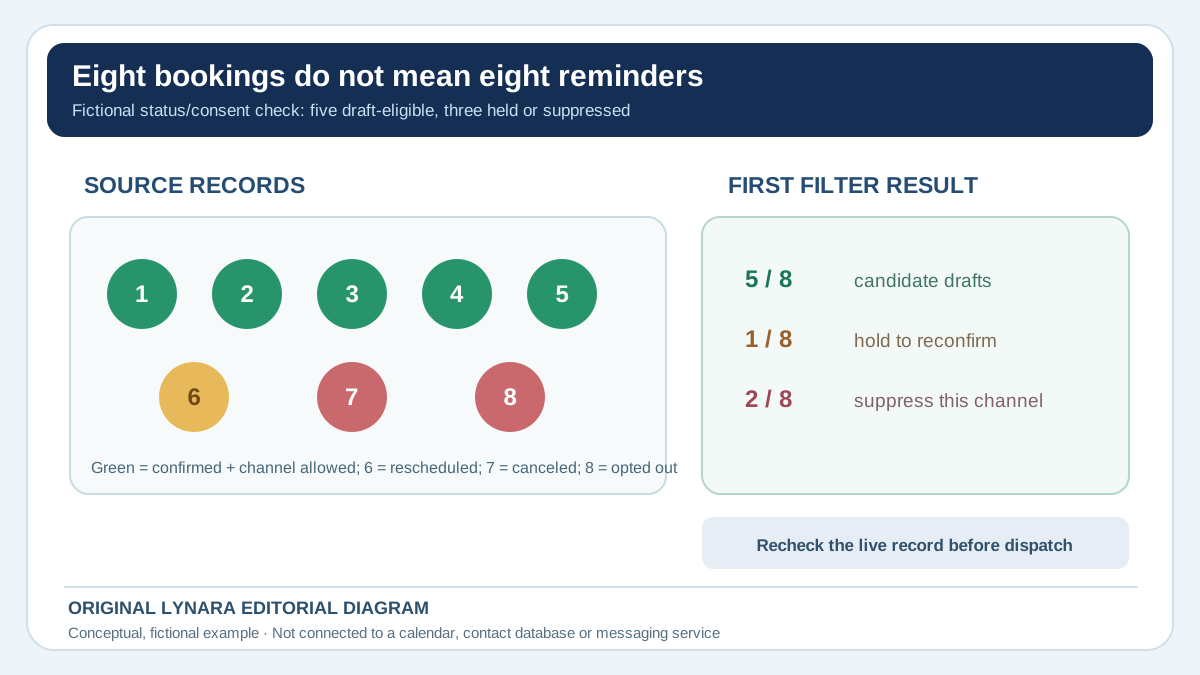
Imagine you export eight booking records for tomorrow. Before asking for a single sentence, classify them. This is a fictional test dataset, not a customer's schedule:
| Booking records | Booking state | Reminder-channel status | Action |
|---|---|---|---|
| 1–5 | Confirmed, with a checked local time | Approved for the proposed channel | Eligible for five drafts; still recheck before sending |
| 6 | Rescheduled; new slot unconfirmed | Not relevant until the slot is confirmed | Hold; do not imply the requested time is booked |
| 7 | Canceled | Even a previously allowed channel does not restore the appointment | Suppress this reminder |
| 8 | Confirmed | Customer opted out of the proposed channel | Do not send by that channel; check any permitted alternative separately |
Only five of eight records pass this illustrative first filter. If your assistant produces eight reminders, it has missed the most important part of the workflow. If it produces four, find out which eligible booking it dropped. Neither count overrides the business's actual messaging permissions or policy.
Keep a small rejection log for exceptions
Give each blocked candidate a reason that a staff member can verify: missing confirmation, changed slot, canceled booking, recipient mismatch, unverified time zone or no permission for the proposed channel. Do not solve a failed check by making the AI rewrite the message more confidently. A draft may be grammatically perfect while the underlying action remains unauthorized.
Review the exception counts after a pilot, separating data-quality failures from language-generation mistakes. If half the rejected reminders come from stale calendar exports, the next improvement should be the scheduling integration, not a longer prompt. For each resolved exception, record who confirmed the change and which system state authorized the draft. Keep retention and access appropriate to the business; the goal is an accountable decision trail, not to store more customer information than necessary.
Every candidate must retain the same booking ID, date, time, service and location as the approved record. Put the status snapshot next to the draft during review. If the AI output contains six reminders, identify the extra booking instead of treating the extra message as harmless. If it contains four, find the missing confirmed appointment. The ratio of five to eight is merely a made-up example of status filtering. Real businesses should define their own eligibility checks and measure actual reminder errors, not infer benefits from these hypothetical numbers.
Use a template that does not make promises
A constrained drafting instruction might say: Using only this approved confirmed-booking record, write one concise appointment reminder. Preserve the date, displayed local time, location and service exactly. Do not add a different start time, claim a staff member is available outside this slot, offer a new appointment, promise a duration or price that is not in the record, or imply that a cancellation request was accepted. If status is not CONFIRMED or channel permission is not verified, return HOLD FOR REVIEW. Include the approved customer-service reply channel instead of inventing a rescheduling link.
A sample message could be: Reminder: your vehicle-detailing appointment is confirmed for Tuesday, October 27 at 2:00 p.m. at our Main Street location. If you need to change your booking, contact our team using the details in your confirmation. The date, time, business and appointment are fictional. The model must never use that example as a default for actual customers. Good reminder copy is simple enough to be templated without AI. If AI adds no material benefit beyond minor word choice, the deterministic template is likely the better operational choice.
Protect customer information and avoid oversharing
Most reminders do not require full names, personal histories, private notes or detailed reasons for the appointment. A shop might need only the booking ID and the type of service; a health or counseling provider may face considerably stricter confidentiality obligations. Do not upload sensitive appointment details to an unapproved model. If the business works with regulated information, confirm the vendor and disclosure rules before building the workflow. Removing unnecessary data is both a privacy practice and a way to keep output focused on the information required by the customer.
Give the AI only the minimum fields required for the draft. Keep contact lists, consent records and actual send permissions inside approved systems. Our AI vendor approval guide covers the upstream decision about external providers. If that review has not happened, a team can still improve reminder quality with a local, manually completed template. There is no reason to expose a complete client database simply to make “See you tomorrow” sound more polished.
Human review at the point of sending
For a pilot, a staff member should compare each candidate with the live booking and permission record. Check the correct recipient, unique booking ID, current status, displayed time, location, service, message channel, opt-out state and rescheduling instructions. Where sending is automated, require the software to revalidate these fields close to dispatch rather than trusting a text file generated hours earlier. An appointment canceled at noon should not receive a stale “we'll see you tomorrow” message at 5 p.m. merely because it passed review in the morning.
The AI Claim Verification Tracker can help organize statements such as booking time, location and status for manual review. It does not connect to a calendar or send SMS. Use the AI Workflow Suitability Checker to identify where review and permissions are necessary before treating the task as safe for automation. Keep the approved text and relevant record version in normal business audit logs, with the access and retention controls your company uses. If the model invents an availability claim, reject the message and investigate why that field was unconstrained.
Measure a useful outcome, not just messages generated
Track the number of eligible bookings, approved reminders, held exceptions, wrong-time drafts, failed deliveries, opt-out mistakes and customer correction requests. A high send count is not automatically a success. If a reminder causes customers to appear at incorrect times, the workflow has failed its central task. Do not invent a no-show reduction percentage without testing it. Compare actual appointment attendance and staff time before and after the change only when other operational differences are understood.
Suppose an imaginary shop prepares 100 eligible reminders a month. A deterministic template takes 30 seconds of staff checking per record, or 50 minutes total. An AI workflow takes 15 seconds to produce a draft but still needs 30 seconds of verification per record, or 75 minutes before additional setup. Faster text generation did not make the overall process faster in this hypothetical comparison. If a better integration reduces real verification labor while preserving safety, enter observed numbers into the Business AI ROI Calculator and include messaging-provider fees. Do not assume that a generated message is free or that all booked customers want an automated reminder.
The safest reminder is a verified one
Define the eligible booking status, use a reliable source of date and time, preserve the correct location, check channel permissions and suppress messages after cancellation or rescheduling. Keep promotions separate from operational reminders. Make exceptions visible to staff, and give customers a real way to correct a booking. If the business only needs a fixed sentence with verified fields, use a fixed sentence. AI becomes useful when it improves clarity or localization within a process that already controls the facts.
All appointments, dates, performance timings and business situations here are invented examples. They are not measured results and do not establish legal compliance for any channel. The practical lesson is transferable to almost any appointment-based small business: letting a model write text is relatively easy; making sure the text describes the right booking at the right moment is the part that deserves attention.