Small Business AI Task Prioritization: Safety Gates and Pilot Math
Rank time-saving candidates only after data, approval and human-review blockers are visible.
Do not start with the task that looks most expensive
Small-business teams often notice one painful process and immediately ask whether AI can remove it. That instinct can point to the wrong first project. A task might consume many staff hours but also involve confidential records, consequential decisions or live changes that require formal controls. Another task may save fewer hours yet be much easier to test with public information and a human reviewer. Prioritization therefore needs two separate questions: is this workflow suitable for a supervised pilot? and, only then, how much net time could it save after review? Our AI Task Priority Planner keeps those questions in that order rather than blending them into an opaque score.
Build a candidate list from work people actually repeat
Begin with three to six tasks that recur every week. Examples might include drafting answers from a public FAQ, formatting a weekly internal meeting summary, checking a known spreadsheet structure, preparing an outline from approved notes or converting a standard intake form into a first-pass checklist. Avoid starting with vague labels such as “do marketing with AI.” A candidate should have a clear start, a clear output and an identifiable reviewer. Record how many times the task occurs and how long it takes today. If nobody can agree on what counts as one occurrence, the process is probably not defined well enough to automate yet.
Write a one-page intake card before you score any task
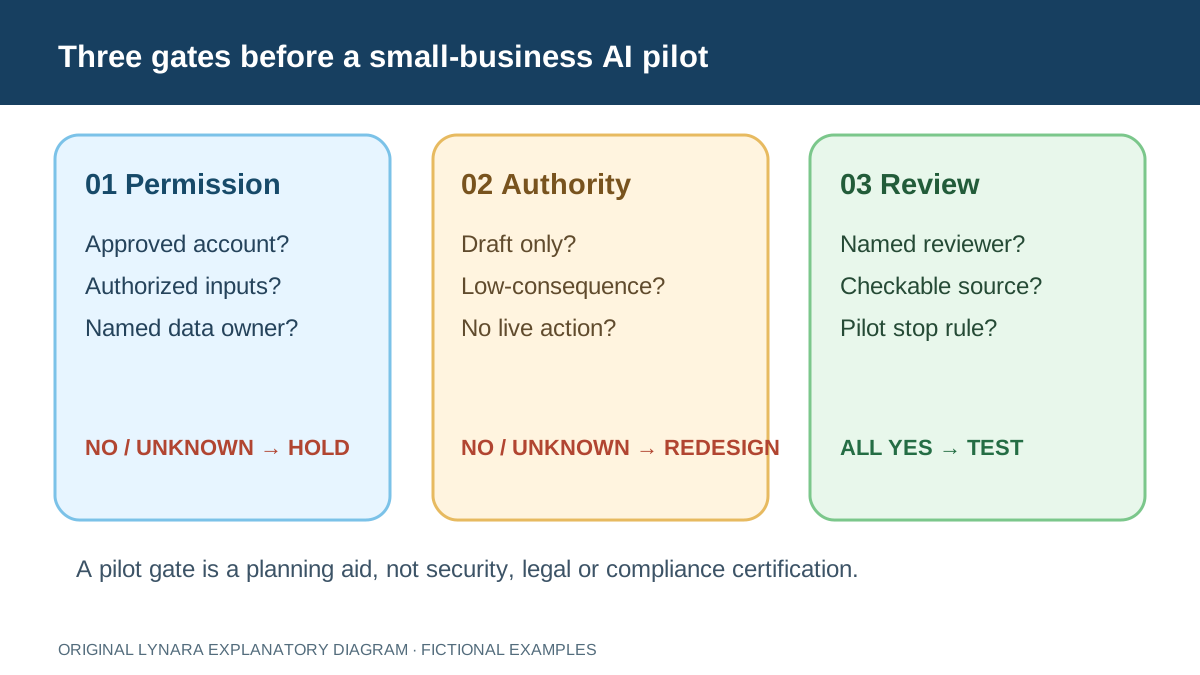
Give each candidate a stable name and an owner. Record its trigger (for example, a new FAQ request), the exact input source, the output a reviewer must approve, the number of weekly occurrences, and the version of the policy or template used. Add a separate field for data classification: public, approved internal, or restricted. Finally, state what the assistant is permitted to do. “Create a draft in a test folder” is a narrower authorization than “send a reply” or “issue a refund.” If any owner cannot answer a field, mark the task HOLD rather than guessing a favorable score.
For a tiny business, this can be a six-column worksheet rather than a procurement document. A sample row might read: “Public FAQ reply | website FAQ v3 | public only | draft only | support lead approves | stop if a price or refund rule is unsupported.” This is a fictional operating example, not a certification. Ask the reviewer to confirm that the FAQ is current before the pilot. If the task changes from public text to customer account history, repeat the intake instead of carrying forward the earlier approval.
Measure the whole assisted process, not generation speed
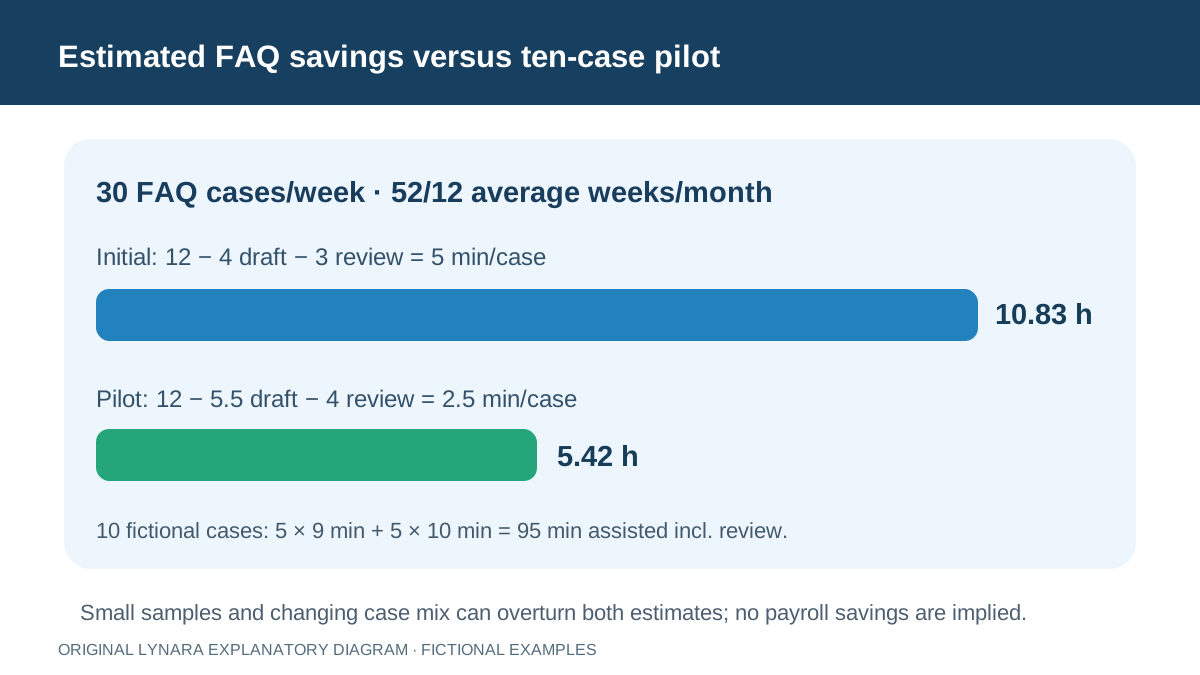
A model might generate a draft in thirty seconds while the employee spends five minutes checking customer details, correcting a policy statement and formatting the result. The relevant comparison is manual time versus assisted time plus human review. Suppose a routine FAQ response takes twelve minutes manually, four minutes with an assistant and another three minutes to verify. Net savings are five minutes per task, not eight. At thirty tasks each week, monthly net capacity is approximately 30 × 52 ÷ 12 × 5 ÷ 60 = 10.83 staff hours. That is useful planning information, but it is still capacity rather than automatically realized cash savings.
Run a safety and authority gate before ranking hours
A task should not become the number-one automation opportunity merely because its estimated time benefit is large. The planner reuses the logic behind our AI Workflow Suitability Checker. It asks about information type, consequence of an incorrect answer, whether the system only drafts or can send or modify records, whether the organization has approved the tool and intended use, whether a current source can be verified, and whether a named human reviews the output. Restricted information, an unapproved tool, high-consequence work or an unreviewed live action can trigger a stop condition instead of a productivity ranking.
Why a simple time ranking is more honest than a mystery score
Many prioritization templates create a 0–100 score by assigning arbitrary weights to “impact,” “effort” and “risk.” That can hide the actual decision. Lynara deliberately avoids claiming that 82 points is objectively better than 76. Among tasks that pass the supervised-pilot gate, the tool ranks only estimated net monthly staff hours saved. Every input and equation remains visible. Tasks that need policy review stay outside the ranking until the controls are resolved. Tasks with zero or negative net time are labeled as not time-saving. This makes the ranking easier to challenge and update when real pilot measurements arrive.
Worked example: three very different candidates
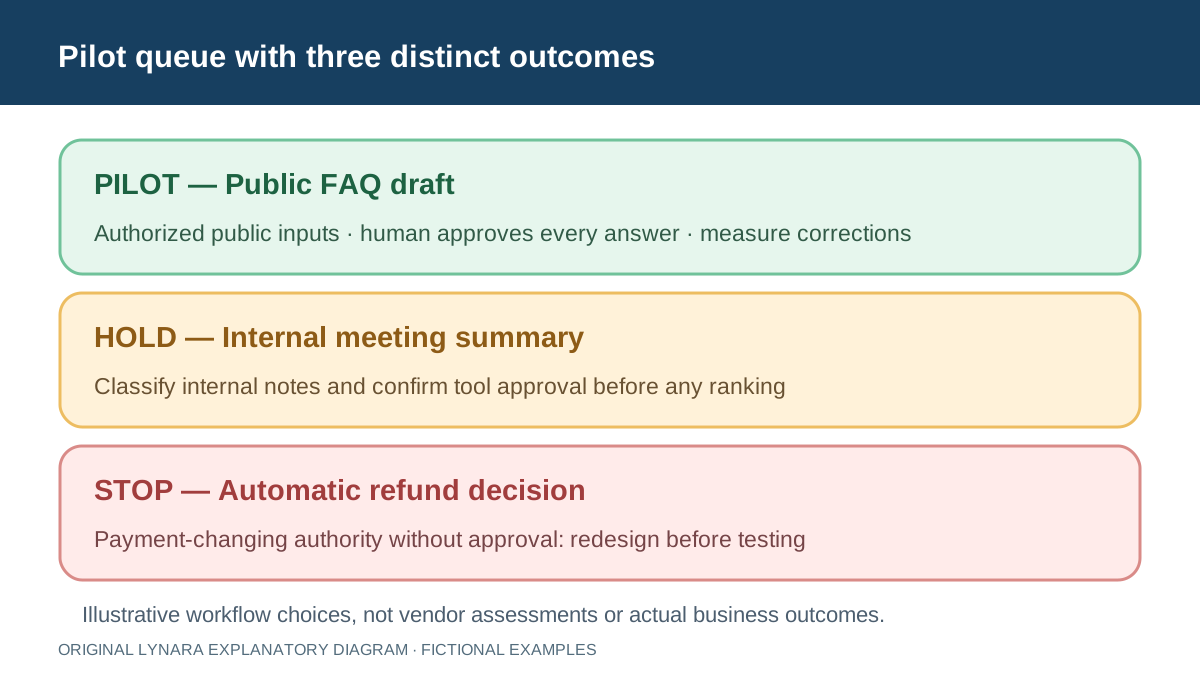
Consider three fictional tasks. First, a public FAQ draft happens thirty times per week, takes twelve manual minutes, four assisted minutes and three review minutes. It is low-impact, draft-only and human-reviewed. Second, an internal meeting summary happens three times per week, takes twenty manual minutes, five assisted minutes and eight review minutes, but uses internal information; it therefore needs policy and access review before it can be ranked as a simple pilot. Third, an automatic refund decision happens twelve times per week and appears to save eight minutes each, but it can affect customer payments and has no human approval before action. That candidate should not outrank the FAQ just because its time estimate is attractive.
Calculate the time estimate, then apply the eligibility gate
These are illustrative inputs, not measurements from a business. To put the three candidates on the same time scale, calculate net minutes per task as manual minutes minus assisted minutes minus human-review minutes. Convert weekly activity to a monthly planning estimate using tasks per week × net minutes per task × 52 ÷ 12 ÷ 60. This is an average-month convention; it is not a promise of actual monthly savings.
| Candidate | Net minutes per task | Modeled hours per month | Decision |
|---|---|---|---|
| Public FAQ draft, 30/week | 12 − 4 assisted − 3 review = 5 | 10.83 | Eligible for a small, human-reviewed pilot only if inputs and output are authorized |
| Internal meeting summary, 3/week | 20 − 5 assisted − 8 review = 7 | 1.52 | Controls first: confirm information classification and tool access before ranking |
| Automatic refund decision, 12/week | 8 apparent minutes saved; review and approval not established | 6.93 (speculative) | Stop this automatic-action design until approval, policy and human control are redesigned |
The FAQ estimate is 30 × 5 × 52 ÷ 12 ÷ 60 = 10.83 hours per average month. Internal meeting summaries would be 3 × 7 × 52 ÷ 12 ÷ 60 = 1.52 hours if the assumed times held, but permission to use internal content still needs to be established. The apparent refund saving is 12 × 8 × 52 ÷ 12 ÷ 60 = 6.93 hours. That number is not an acceptable basis for automating payment decisions without appropriate oversight. A blocked workflow stays outside the usable priority ranking regardless of the apparent positive time.
A pilot should challenge the estimate, not merely confirm it. For example, imagine a separate hypothetical ten-case FAQ pilot finds a five-and-a-half-minute assisted draft and four minutes of review on average, against the same twelve-minute manual baseline. The net saving would fall to 2.5 minutes per case, or 5.42 modeled hours per average month at thirty cases per week—not the original 10.83. Record case mix, correction count, reviewer, observed timings and exceptions; stop or revise the experiment when sensitive information, an incorrect answer or an unexpectedly large review burden appears.
Use the AI Workflow Suitability Checker to make the gating questions explicit, then enter only eligible candidate tasks in the AI Task Priority Planner. Keep any financial forecast separate until the pilot timings are credible. These examples illustrate a prioritization method; they do not establish authorization, regulatory compliance, security or guaranteed business returns.
Audit a ten-case pilot instead of trusting the first estimate
The ten-case FAQ pilot above is hypothetical, but it can be made auditable. Suppose five ordinary cases take five minutes to draft and four to review; five slightly harder cases take six minutes to draft and four to review. The total assisted time, including review, is 5 × (5 + 4) + 5 × (6 + 4) = 95 minutes. That is 9.5 minutes per case. Against a twelve-minute manual baseline for each of the ten comparable cases, the modeled saving is 120 − 95 = 25 minutes across the sample, or 2.5 minutes per case. At thirty weekly occurrences, 30 × 2.5 × 52 ÷ 12 ÷ 60 = 5.42 hours per average month after rounding, not the original 10.83.
A ten-case sample cannot establish what will happen for all customer questions. Record which cases were excluded, whether the reviewer had to reopen a source, and whether a policy error was caught before any message was sent. Include failed or slow cases in the measurement rather than reporting only easy successes. Keep the manual baseline matched to case complexity; otherwise a seemingly faster assisted process may reflect different work. If the team cannot reproduce the case log, the figure stays an estimate rather than a verified performance claim.
Use the planner result as a queue, not an approval list
A “pilot candidate” means only that the self-reported conditions describe a low-impact reviewed draft with positive net time. It does not certify software security, employee consent, contractual permission or compliance. The next step is a controlled sample using authorized information. Measure correction rate, review time, exceptions and whether the same source remains valid. A “controls first” result means resolve the named policy, source or operational issue before comparing productivity. A “stop” result means the current design should not proceed as entered; redesigning the workflow may later produce a different result.
Make the decision visible: pilot, hold or stop
A useful prioritization meeting ends with a named next action, not just a sorted spreadsheet. For the public FAQ candidate, PILOT means use authorized public content, keep every draft unsent until a reviewer approves it, and log ten representative cases. For the internal meeting summary, HOLD means ask the information owner whether internal notes may be processed by the chosen tool and who can access the output. For an automatic refund, STOP means do not allow the system to change payments under the proposed design. A later human-approved draft workflow would need its own screening and pilot; it is not automatically cleared by this example.
Write down a stop rule before the first test. Examples include a proposed customer reply that contradicts the approved FAQ, an unexpected request for restricted records, a missing reviewer, or a tool that attempts a live action outside the draft-only scope. Keep a dated decision log with task, evidence, reviewer, reason, next check date and unresolved questions. The resulting queue is more useful to a shop owner than a generic “high ROI” badge because someone can actually act on it and explain why a tempting candidate was deferred.
Do not ignore tasks that save no time
A task can still have value even if the first pilot shows no net time savings. An assistant might improve consistency, reduce repetitive typing or make it easier for a new employee to follow a checklist. Those benefits require their own evidence rather than being disguised as hours saved. Conversely, a workflow that produces beautiful summaries but adds ten review minutes should not be sold internally as an efficiency project. The planner marks negative or zero net time explicitly. If the goal is quality rather than speed, define a quality metric and evaluate it separately instead of manipulating the productivity formula.
Move the top candidate into a financial model only after measurement
Once a task passes the gate and a small pilot has measured realistic before, assisted and review times, the next question may be whether the subscription is financially worthwhile. Use the Business AI ROI Calculator for that stage. It adds adoption percentage, labor-value assumptions, recurring software expense and setup cost. This separation matters. A task-priority planner identifies where to experiment; an ROI model evaluates a specific investment scenario. Neither should be used to claim guaranteed profit, revenue growth or a reduction in payroll that has not actually occurred.
Keep data classification attached to the workflow
The same apparent task can change category when its inputs change. Drafting a generic appointment reminder from a public template is different from drafting a message that contains a customer's medical information, account balance or protected employee details. Do not copy a workflow label from one use case to another and assume the original approval still applies. Record the information category, approved account, source owner and reviewer alongside the task definition. If the business starts using a new data source or gives the assistant authority to send messages, screen the workflow again before treating previous pilot results as relevant.
Governance is a process, not a one-time checkbox
The NIST AI Risk Management Framework (AI RMF 1.0, released January 26, 2023) is intended for voluntary use and describes broader practices for governing, mapping, measuring and managing AI risk. NIST published its Generative AI Profile in July 2024 as a companion resource. The AI RMF Playbook offers suggested practices, not a mandatory certification checklist; NIST notes that AI RMF 1.0 is under revision as of October 2026. These publications do not certify Lynara's tools or an individual company's deployment. They reinforce the idea that risk management spans design, use, measurement and ongoing review. A small team can apply that principle by assigning a workflow owner, logging failures, documenting source changes and reviewing the process again when the technology or business context changes.
A practical weekly prioritization routine
Once a month or quarter, ask team members for repetitive tasks that feel expensive or frustrating. For each candidate, collect a recent manual-time sample and document who verifies the output. Enter no more than six tasks at once so the discussion remains concrete. Remove anything with unclear permission or high-consequence decisions from the productivity contest. Run a short supervised test for the most promising low-impact candidate, then replace estimates with observed numbers. If the measured review burden is larger than expected, re-rank the list. The best first automation is not necessarily the biggest task; it is often the safest well-defined task with a measurable positive result.
How this fits the rest of Lynara's business tools
Use the Suitability Checker when you need a detailed review of one workflow. Use the Task Priority Planner when several candidate tasks compete for attention. Use the ROI Calculator after a pilot has produced credible timing and adoption assumptions. Freelancers pricing one client deliverable should use the separate project quote calculator, because project pricing is not the same question as recurring process automation. Keeping these decisions separate makes each result easier to audit and reduces the temptation to turn one number into a universal “AI business score.”
Continue with the AI for Work & Business hub for related professional tools and guides.