Audit SaaS Licenses Before Your Small Business Renews
A team of twelve can quietly end up paying for eighteen software accounts. Finding the difference is useful—but an inactive login, an unassigned license and a cancelled billing commitment are three different things.
The expensive problem often starts with a reasonable purchase
A business buys a collaboration tool for its initial staff. A few months later, contractors join for a project, somebody adds a second plan for a new department, and an employee leaves. Nobody is doing anything obviously reckless: the subscriptions were purchased to solve real problems. But the renewal arrives with more paid seats than the team currently uses, multiple administrators and perhaps a second card paying for a forgotten trial.
“Ask AI what we can cancel” sounds like a quick solution. In reality the useful first step is a controlled inventory: what the business is paying for, who or what depends on each service, who owns the contract and when its terms allow the bill to change. The model can help organize a table and identify missing fields, but it cannot know whether a user who has not logged in recently is responsible for an automated export, a shared mailbox or a seasonal task. It also cannot authorize breaking an agreement or removing somebody's access.
Start with the modest aim of identifying spend worth reviewing, not promising a percentage saving. A business that eliminates necessary access to meet an arbitrary savings target may end up buying the same subscription again under worse terms. A useful audit should leave the company with clearer ownership, not just fewer icons in its app launcher.
Build a subscription register from actual bills
Create one row per contract or subscription, not one row per software brand. Record the product and plan, billing account or purchasing entity, invoice or order reference, payment owner, billing frequency, base fees, seat quantity, price per seat, renewal date, notice deadline, minimum commitment and where the signed terms live. Note whether it is billed directly by the vendor or through a reseller. One business may have two subscriptions for the same tool with different renewal dates or rights to reduce licenses.
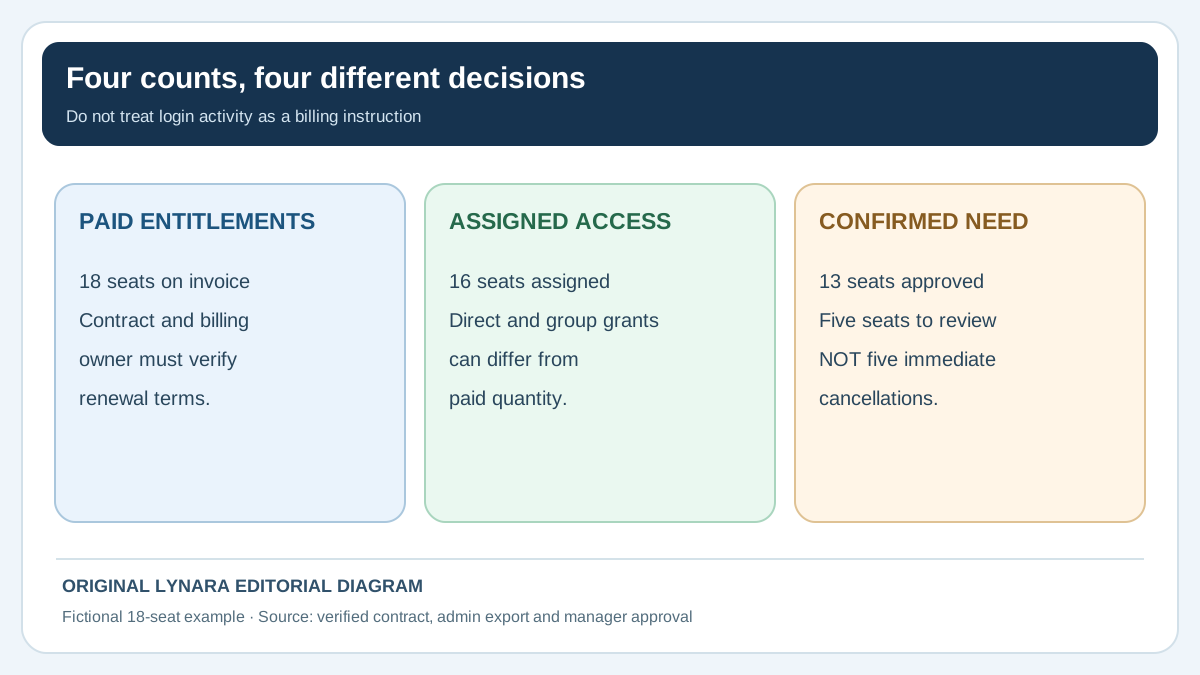
Check the last few actual invoices against the administration portal and the accounting ledger. A line for eighteen licenses on a bill is not necessarily a line for eighteen active employees. Conversely, the admin console could show assignments from several different subscriptions, while the finance team pays each separately. Keep those concepts in different columns: paid entitlement, assigned access, recent observed use and confirmed business need.
Microsoft's official group-based licensing instructions show that group assignments and direct assignments need to be reviewed separately. A user can inherit access through a group even when an administrator has not assigned a license to that person individually. The invoice remains the source for purchased quantities, not a login report. A small business cannot safely determine its actual bill from an employee roster alone. Use the source and screens applicable to the specific vendor and plan rather than assuming all SaaS products expose identical data.
Protect the register. It may contain employee names, access rights, negotiated pricing and identifiers for financial accounts. Give a named owner permission to maintain it and share only the summary fields necessary for a cost discussion. Do not paste a full list of employees, recovery addresses or account IDs into a consumer AI chatbot unless the company's approved privacy and vendor arrangements explicitly allow it. The AI vendor approval guide offers a practical checklist for that decision.
Use an evidence register before making the cancellation list
Keep a short, auditable record for each proposed change. A billing line alone does not tell you who uses a license, and an inactive account alone does not prove that a contract can be reduced. This sample uses invented identifiers and amounts so that you can adapt the method without copying real employee data into an external service.
| Candidate | Evidence to check | Owner decision | Billing outcome |
|---|---|---|---|
| Seat A: former staff | Offboarding complete; data transferred; no group reassignment | Access removal approved | Verify whether seat quantity can change |
| Seat B: seasonal role | Low recent activity; manager confirms next-quarter need | Retain until agreed review date | No reduction requested |
| Seat C: integration owner | Browser login inactive; scheduled export still running | Hold until credentials and data ownership are migrated | No reduction yet |
| Seat D: duplicate assignment | Direct and group access overlap; administrator verifies dependency | Review and safely correct assignment | Do not assume invoice changes |
For every row, save the source reference and date, the business owner who signed off, the approved action, and the person who can confirm the invoice afterward. Use an explicit HOLD state for missing permissions, unclear data ownership or unverified renewal terms. The audit is incomplete when any proposed cancellation is justified only by an AI-generated statement.
Keep access security separate from cost optimization. A departed employee's account may need immediate access revocation under your security process even if the vendor still bills for the associated seat. Conversely, a service identity should not be deleted to hit a savings target before a documented owner has verified the integration and recovery plan.
Worked example: five seats to review, not $1,440 guaranteed
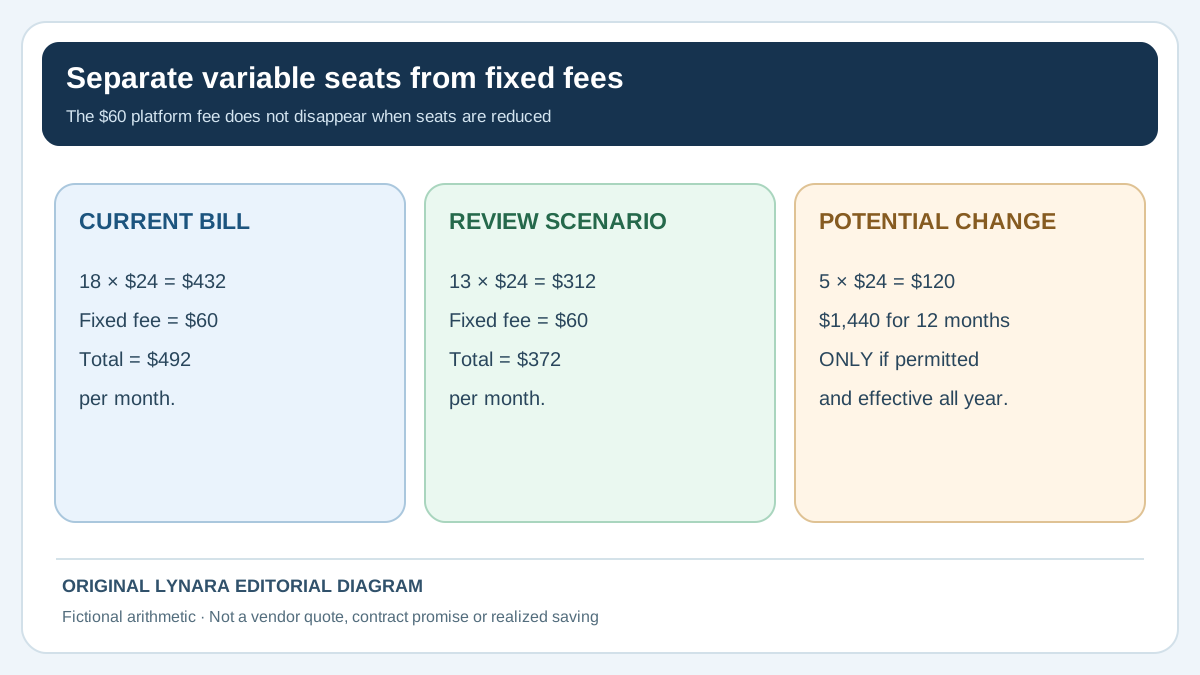
Consider a fictional company that pays for 18 software seats at $24 each per month, plus a fixed $60 monthly platform fee. The equivalent monthly total is 18 × $24 + $60 = $492. Twelve months at that unchanged rate would be $5,904, before tax or contract adjustments. Following a documented team review, managers believe only 13 of those seats are still required. That leaves five seats to investigate.
Five multiplied by $24 equals $120 per month, or $1,440 across a hypothetical 12-month period. Those figures describe the seat portion of the current bill that could be affected if the vendor permits a reduction. The fixed $60 platform charge stays. At 13 paid seats the illustrated monthly bill would be 13 × $24 + $60 = $372, not $312. Calling the full $180 difference a possible saving would double-count the fixed fee.
Our free SaaS License Cost Reviewer performs this arithmetic with user-entered figures. It deliberately labels the result “reviewable” and does not cancel or contact a vendor. It is useful when a manager wants to separate a straightforward dollar calculation from the contractual question of whether reducing paid seats will actually alter the invoice.
The decisive detail is that reducing access and reducing billed subscriptions are separate operations. Microsoft's official guide to buying or removing business licenses distinguishes billing account types and reduction windows. For certain Microsoft Customer Agreement subscriptions, removal is limited to a short window after purchase or renewal; a reduction outside that window may not affect the invoice until renewal. Prepaid subscriptions and reseller purchases can have different restrictions. Some changes are available only in defined windows or at renewal. The five apparently unused seats in the example may remain payable for the current commitment. A staff member should verify the relevant plan terms and any renewal or notice deadline before reporting cash savings.
Decide whether a seat is really unnecessary
A last-login timestamp is a clue, not a conclusion. An account may be used by a part-time specialist, retained for a regulated handover, scheduled for a seasonal workload or required for a business continuity process. A service or administrative identity might interact with software through an integration rather than a normal browser session. On the other hand, a departed employee's license can remain assigned long after all appropriate access removal and data transfer procedures are complete.
Have the relevant team owner classify each seat. Useful categories are: actively needed; needed for an agreed future date; temporary or shared process requiring an alternative plan; former user pending a documented offboarding step; and genuinely unneeded after review. Record who confirmed the classification and when. A person who does not use the tool daily may still have a valid role, so do not make the decision solely from usage analytics or an AI summary of those analytics.
Before changing any account, check where its files, dashboards, scheduled reports and integrations live. Some products tie data ownership or automation credentials to a user. Removing that user without transferring ownership may interrupt a customer workflow or make business records difficult to recover. Ensure the team has an authorized plan for preservation, transfer, offboarding and recovery. License hygiene is also an access-security process: a former worker should not retain unnecessary permissions merely because the subscription cannot yet be reduced.
Compare recurring charges without mixing billing periods
A monthly plan can be compared with an annual contract by translating each verified price into a monthly equivalent, but that is only arithmetic. It does not mean the annual customer can stop paying monthly. Suppose Vendor A charges $18 per seat every month and Vendor B quotes $180 per seat for a full prepaid year. The equivalent monthly cost of B is $15, but switching could require a new annual cash commitment, migration, retraining and the loss of features your team relies on. Comparing $18 against $15 without those terms is incomplete.
Account for fixed platform fees, tier minimums, support packages, one-time onboarding, storage overages and sales taxes separately. A bundled price may become more expensive when the team shrinks below a minimum. A tool described as “free for up to five users” may restrict features that matter to your process. Conversely, reducing two redundant systems into one is not automatically better if the remaining product lacks a necessary capability or creates a single point of failure.
The right result may be “leave the tool in place, but consolidate which staff need paid seats.” Another sound result may be “schedule a change at renewal, subject to data export and approval.” Keep a written comparison of full-year cash commitments, not only per-seat headlines. If a replacement needs supplier negotiation, our Supplier Quote Comparison Checker can help normalize explicit purchase quantities and fees, but software features and contract terms still require human assessment.
Use AI for preparation, with narrow permissions
AI can speed up the clerical side when provided with an approved, minimized table. It can group subscriptions by department, list missing renewal dates, draft questions for the finance owner or turn reviewed findings into an executive summary. A useful instruction is: “Use only the approved subscription register provided here. Show the invoice row behind every claimed price, classify missing data as UNKNOWN, and distinguish paid seats from assigned seats and confirmed business need. Do not assume an unused login can be cancelled or that a reduction will take effect now. Do not contact a provider or change any permissions.”
Review the AI output line by line for the values most likely to reverse a decision: currencies, per-user versus per-workspace charges, monthly versus annual pricing, seats added during a billing cycle, and the renewal date. In a multi-entity company, verify which legal entity signed each contract. Two similar subscription names in a table may be separate products with different rights, or they may expose a genuine duplicate purchase. The model should flag the possibility, never delete a row to make the summary neater.
Use the AI Claim Verification Tracker for statements such as “the subscription can be reduced immediately.” Attach the current official contract or verified provider response to that claim. It should not be marked confirmed because a model cited an unrelated help article. A correct vendor manual may still describe a different plan or billing relationship from the one your business actually holds.
Keep the improvement measurable
If your company spends four staff hours collecting records and reviewing AI output, it is not automatically a failure. A carefully checked audit might prevent a year of duplicate charges or expose an important security issue. But it is important to keep different benefits separate. Reduced paid seats are a vendor billing outcome; faster report preparation is a productivity outcome; removed unauthorized access is a security outcome. They should not all be counted as “AI savings.”
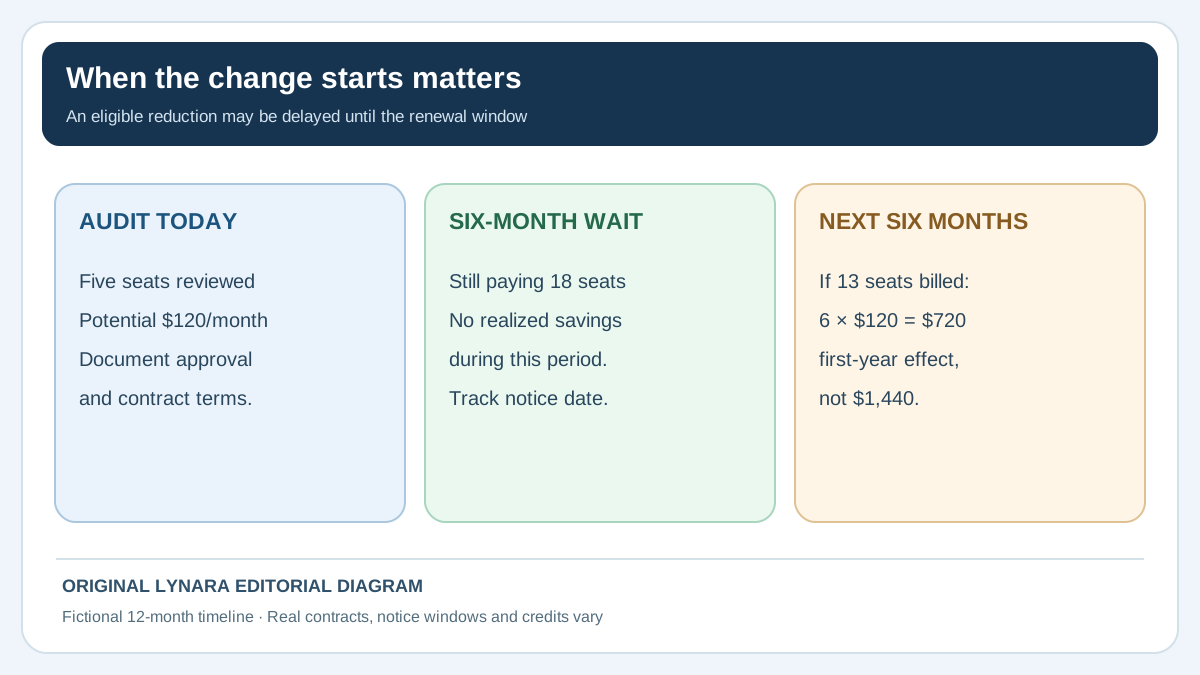
Track the audit's starting spend, approved changes, effective invoice dates and actual bill adjustments. If a five-seat reduction takes effect only after six months, the first-year cash effect differs from a full twelve-month projection. Document that timing rather than multiplying a monthly estimate by twelve without qualification. For any claim about time saved by an AI-assisted process, record the old and new staff minutes including manual checking. Use the Business AI ROI Calculator for that separate productivity analysis.
Timing check: In the fictional $120-per-month example, a reduction effective today for all twelve months would affect $1,440 in variable charges. If the contract only allows the change six months from now, the first six months produce $0 in reduced invoices and the next six produce 6 × $120 = $720, before taxes, credits and any changes in rates. If the effective date falls beyond the measurement year, the realized reduction for that year may be $0 even though five seats are no longer needed. Record the exact effective date, not just the request date.
Schedule the next review ahead of the earliest notice deadline. A quarterly look at assigned accounts can help with access hygiene, while a contract review may need to begin much earlier than the actual renewal date. Put responsibility on a named role, not a generic shared inbox that nobody monitors. The aim is to prevent the same unused accounts and billing questions from accumulating again.
A small-team audit checklist
- Export or collect current invoices and contracts from authorized sources.
- Record each subscription separately with the plan, seat count, rates, renewal and notice dates.
- Reconcile paid entitlements against assigned users, actual use and confirmed business need.
- Ask team owners to approve any seat classified as removable.
- Check data ownership, integrations, access security and retention before unassigning anyone.
- Calculate only the variable seat portion that might change, retaining fixed fees.
- Confirm the exact vendor billing rules, commitment and effective reduction date.
- Have the authorized purchaser approve and document the actual change.
- Verify the next invoice and record realized amounts, rather than predicted savings.
That is a practical use for AI in a small business: fewer missing questions and a clearer review package. The decision to remove access or alter a contract still belongs to the people accountable for operations and money.
Primary sources for a vendor-specific check: Microsoft group license assignments and Microsoft business license billing and removal rules. These documents describe Microsoft products, not universal SaaS contract terms. For another provider, obtain its current official instructions and your signed agreement before acting.