Verify AI Weekly Sales Summaries With a Spreadsheet
The weekly sales email can be eloquent and completely wrong. A reliable summary begins with a defined metric, a reconciled order list and a second calculation that does not depend on the AI's confidence.
Why the most convincing paragraph can contain the wrong total
On Monday morning, a small online retailer exports a week of orders and asks an AI assistant for a management update. The response says sales were strong, names the leading category and reports $690 in revenue. It might even calculate a percentage change from last week. Unfortunately, one order was exported twice, one payment is still pending and another order was fully refunded. The prose sounds authoritative because the model can write well. That does not prove its arithmetic or the accounting meaning of its numbers.
The first question is not “Which AI model should we use?” It is “What does this week's sales figure mean?” Gross order value, payments captured, revenue after refunds and deposited cash are not interchangeable. A store may record an order before collecting payment; a payment processor may settle on a later day; a refund may be approved before cash leaves the bank. Choose a metric and its time basis before asking for a report. This article uses an intentionally simple captured sales less confirmed refunds example, not a general rule for recognizing accounting revenue or calculating tax.
Keep the export's original date range, timezone, currency, order status and extraction timestamp. If the source spans Sunday 23:59 in one timezone but the comparison week uses another, you can misclassify transactions even with perfect formulas. Ask whoever owns the financial records which status field and reporting boundary are authoritative. Your AI assistant should not pick those policies itself.
Preserve the raw data and make a working copy
Export only the fields you need: order identifier, transaction or payment identifier, relevant timestamp, currency, payment status, captured amount, confirmed refund amount and product category if you plan to discuss categories. Remove personal names, addresses, card information and other unnecessary customer details. Use an approved company tool and follow the organization's data-handling rules before copying even pseudonymized records into an AI service.
Keep a read-only original and work on a separate copy. That gives you a way to trace every correction. At first, check structural issues such as blank identifiers, inconsistent column widths, headers repeated in the middle, missing amounts or a status spelled several different ways. Our local CSV Quality Checker can flag structural concerns in a file you choose. It does not connect to your store, settle payments or certify sales totals. If a CSV passes structural checks, the financial reconciliation described below still has to happen.
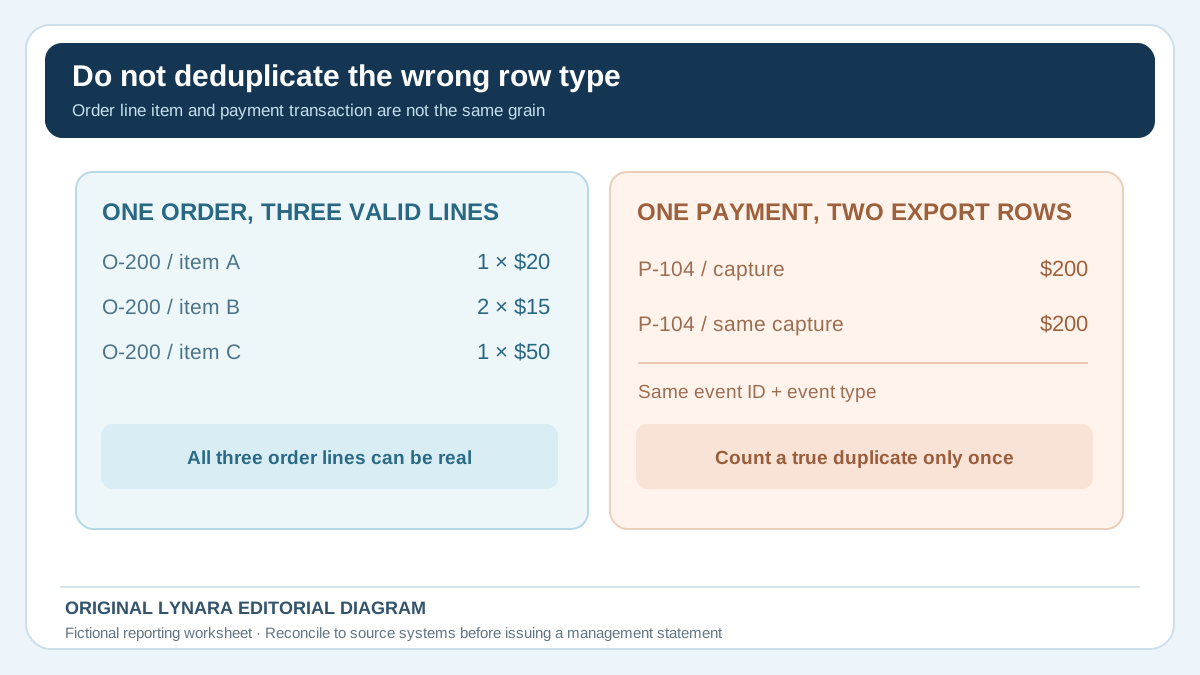
Define the expected grain of each row. Is one row a whole order, one item in an order, one payment event or one refund event? An order with three products could legitimately appear on three rows in an item export. Calling two rows “duplicates” merely because they share an order ID would delete real sales. Conversely, the exact same payment transaction appearing twice in a payment export should not be counted twice. The safe duplicate key often includes a transaction ID and event type, not a single customer or order field.
Worked example: six visible rows, only four distinct paid orders
Imagine these fictional rows in a tiny USD order export. The figures are invented solely for demonstrating the checks, not taken from Lynara, a real retailer or a payment provider:
| Order / event | Amount in export | Confirmed refund | Review note |
|---|---|---|---|
| O-101 | $120 | $0 | Paid |
| O-102 | $80 | $0 | Paid |
| O-103 | $50 | $50 | Paid, fully refunded |
| O-104 | $200 | $0 | Paid |
| O-104 duplicate export row | $200 | $0 | Same payment event as above |
| O-105 | $40 | $0 | Payment pending |
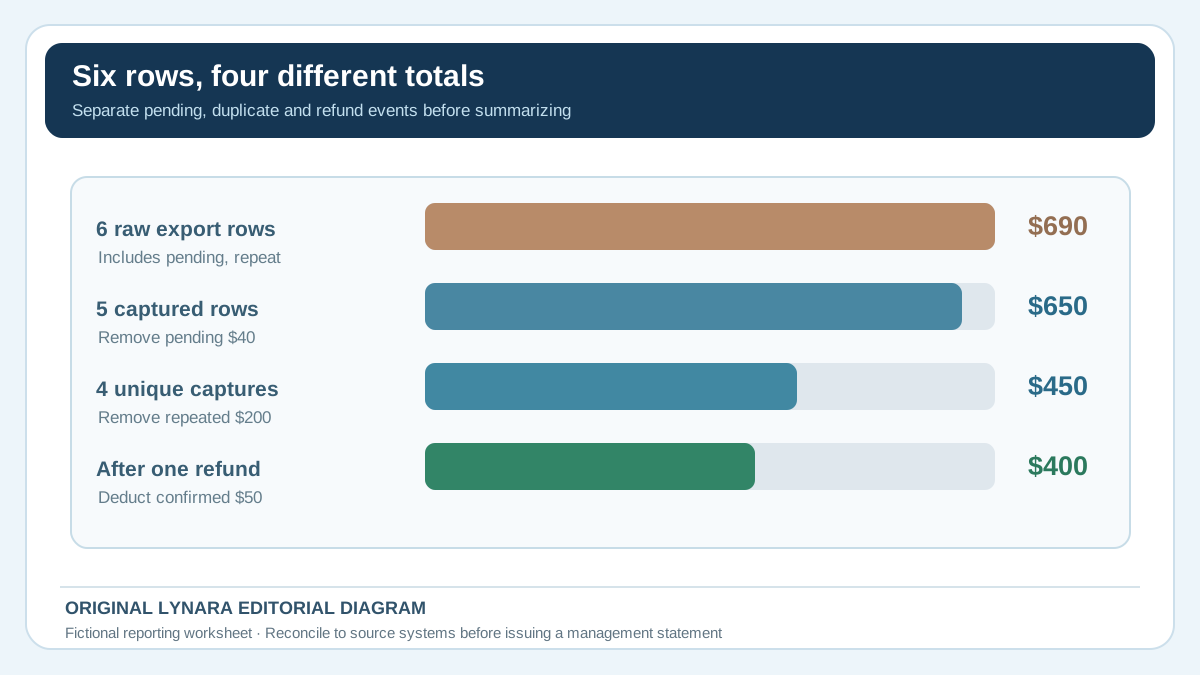
A naive sum of the visible raw amount column reports $120 + $80 + $50 + $200 + $200 + $40 = $690. But this is not the defined net-captured-sales figure. The fifth row repeats the same payment event, the sixth has not been captured, and the third has a $50 confirmed refund. The distinct captured orders sum to $120 + $80 + $50 + $200 = $450. Subtract the confirmed $50 refund once to get $400 for this fictional scenario.
The difference between the careless total and the reviewed amount is $290. Notice that simply telling an AI model “double-check the math” would not fix the problem unless it understands which events are genuine, what the pending status means, and whether refunds are represented as negative rows or separate columns. Those are source-system rules. Humans should establish them from the payment platform and accounting definitions.
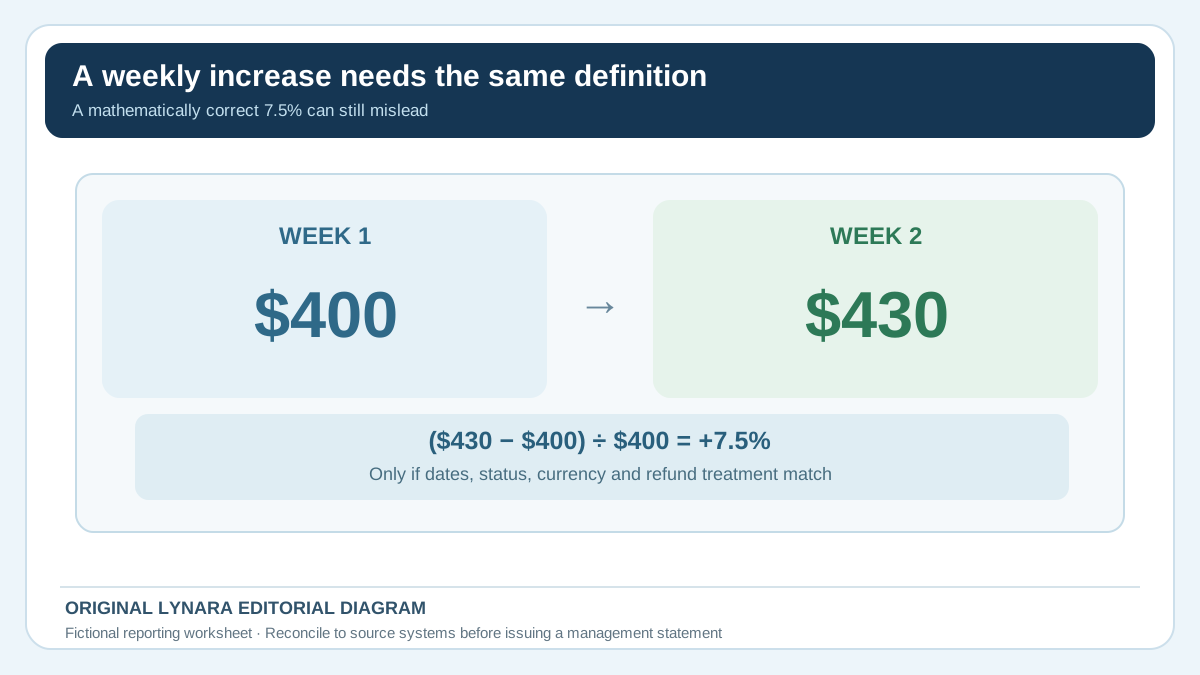
Suppose the next week's figure is $430 using exactly the same definition. The illustrative change would be ($430 − $400) ÷ $400 = 7.5%. But if the next week's figure includes shipping fees while the first week excludes them, that percentage is invalid even though the calculation is correct. Put the metric definition above the percentage, every time.
Recalculate with independent spreadsheet controls
Make a simple control sheet with the selected reporting period, source export timestamp, total row count, distinct payment-event count, captured transactions, refund transactions, pending transactions and net amount. If the original system provides its own period report, compare the reconciliation with that independent report and investigate differences before publication. Do not “force balance” by inserting an unexplained adjustment.
In Excel, a SUMIFS formula can add amounts that meet explicitly defined criteria, such as a status and reporting date. Microsoft's SUMIFS documentation describes how multiple criteria control the sum. A possible control for a sheet in which column D contains correctly normalized captured amounts and column C contains payment status is =SUMIFS(D2:D100,C2:C100,"captured"). This only works if the statuses, row grain and amount fields really match the intended definition; it does not magically remove duplicate transactions or net separate refunds.
For duplicates, compare transaction identifiers within the relevant event type and decide whether repeated rows are real partial payments, legitimate line items or export duplication. Record what you excluded and why. For refunds, decide whether an event belongs to the original sale week or the refund week according to the company's approved reporting convention. Reconcile currencies separately unless your finance team provides an authorized exchange-rate and date methodology. A single unlabelled “sales” sum across currencies is not meaningful.
If the spreadsheet contains formulas generated by AI, test them against a tiny case like the six rows above and a known expected answer before applying them to thousands of transactions. Ask the person doing the review to hand-calculate at least one smaller sample. This is not busywork: it tells you whether the formula implements the business rule rather than merely returning a plausible number.
Practice on a six-row CSV before using any company data
You can reproduce the example with fictional transactions in a local spreadsheet. Copy the following comma-separated rows into a temporary file or sheet; they contain no customer names, payment credentials or genuine business records. Column C is the normalized status and column D is the raw amount exported, not a guarantee that the payment was captured. The repeated P-104 identifier represents one duplicate export of the same payment event.
Show the fictional CSV practice data
event_id,order_id,status,amount_usd,refund_usd
P-101,O-101,captured,120,0
P-102,O-102,captured,80,0
P-103,O-103,captured,50,50
P-104,O-104,captured,200,0
P-104,O-104,captured,200,0
P-105,O-105,pending,40,0
Use this deliberately staged audit sequence rather than adjusting the final total until it looks reasonable:
| Control | Expected result | Reason |
|---|---|---|
| Raw rows and amount | 6 rows; $690 | All six amounts, including the repeated row and pending payment |
| Captured-status amount before de-duplication | $650 | The five captured-status rows, still including P-104 twice |
| Distinct captured payment events | 4 events; $450 | Exclude the repeated P-104 event, not a valid separate line item |
| Confirmed refund | $50 | P-103 refund, counted once |
| Defined net captured sales | $400 | $450 minus $50 |
With this column order, a status-only formula such as =SUMIFS(D2:D7,C2:C7,"captured") correctly returns $650—but it is not yet the desired $400. SUMIFS filters by status; it does not verify that transaction identifiers are unique or that refunds are deducted once. Review repeated payment-event IDs, exclude genuine duplicate exports, then apply the confirmed refund treatment required by your defined metric. An order-level export with multiple valid line items may need a different key altogether.
If you cannot reproduce $690 → $650 → $450 → $400 on this transparent miniature dataset, do not rely on an AI-generated formula for the full file. For a real organization, the record owner must still confirm timestamps, statuses, currencies, treatment of adjustments and the source system's totals. The CSV Quality Checker can inspect selected files for structural anomalies, but this financial reconciliation must be performed using the approved source records and controls.
Let AI write explanations only after the data is signed off
Once the owner of the records accepts the reconciled control sheet, give the AI only the approved aggregate figures and narrative facts it needs. A useful instruction is: “Write a short management summary using only these verified figures, dates and definitions. State the reporting basis. Do not infer why sales changed, invent customer behavior, create missing comparisons or claim a category increased unless category totals are supplied. Put unanswered questions under 'Requires review'.” That prompt keeps the assistant in a drafting role rather than making it an accounting authority.
Watch for causal language. If the report says “revenue rose because our new advertising worked,” ask for the evidence. A numerical increase and a recent campaign can occur together without proving cause. The assistant can say, for example, that the campaign started during the period and that attributed sales have not yet been established. Likewise, a lower order count does not prove weaker demand if stockouts, checkout outages or tracking changes occurred. An honest report separates what was observed, what was calculated and what still needs investigation.
Give the draft a named reviewer and a simple approval checklist: every number matches the control sheet; the date range and timezone are displayed; refunds and pending payments are treated consistently; no customer data leaked into the draft; claimed causes have evidence; and every requested action has an owner. Save the final approved report and the source version together. The US Small Business Administration's business-management resources emphasize accurate bookkeeping as a foundation for managing finances, which is a useful reminder that clear writing depends on the underlying records.
When to stop and ask for help
Pause if sales exports disagree substantially with payment-platform totals, if refunds are being counted twice, if someone changes the report definition without telling readers, or if currency conversions and tax treatment are unknown. A finance professional or authorized bookkeeper may need to reconcile the records. No article or local CSV structural checker can establish the legal or accounting recognition rules for an individual business.
For teams considering recurring AI reporting, compare actual minutes spent on manual preparation against minutes for AI drafting plus validation, exceptions and rework. Run those measured assumptions through Lynara's Business AI ROI Calculator. Do not treat a flashy dashboard or fast summary as evidence of money saved until you measure the complete work. You may discover the most valuable automation is detecting duplicate export rows before the report reaches anyone, while the executive narrative still benefits from a few minutes of human attention.
A trustworthy weekly update can be short: the precise metric, its time period, the verified value, the comparable previous period, one or two observations supported by evidence and any unresolved differences. The point is not to prove the company uses AI. It is to help someone make a decision without being misled by a polished mistake.