Best AI Image Generators for Student Projects: Choose Safely
Pick a generator for the assignment you actually have, not a general winner in a ranking. Features and licensing conditions should be checked directly with providers.
The best image generator depends on the assignment
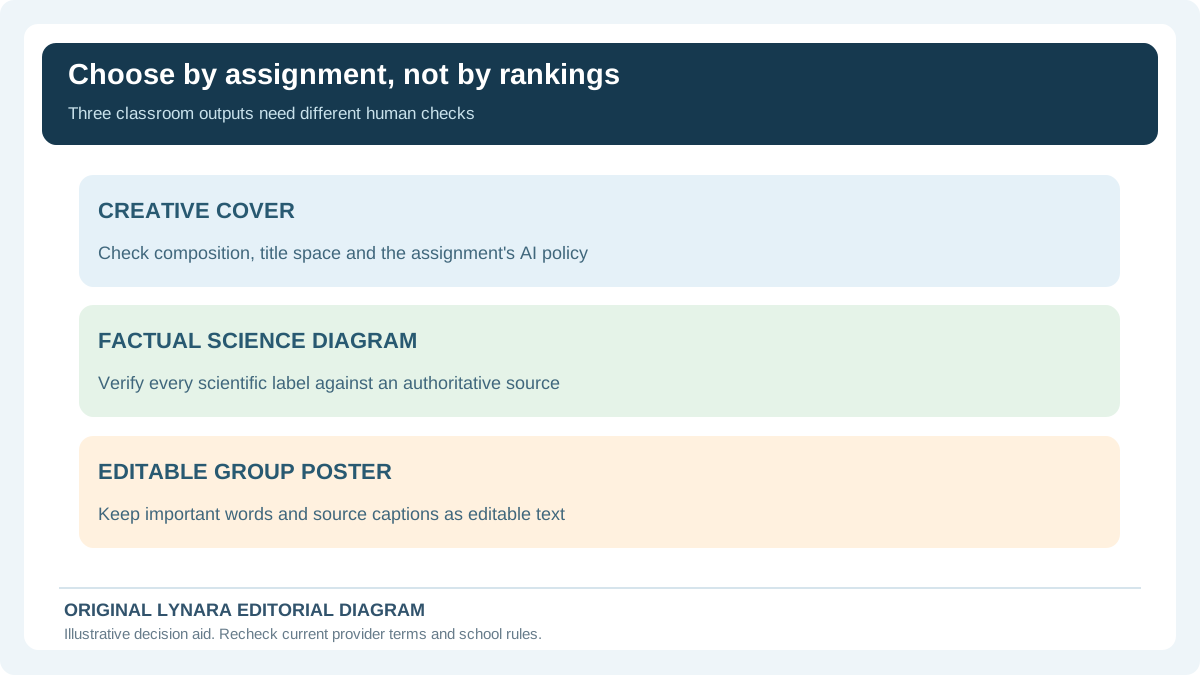
A student preparing a history presentation has different needs from someone creating a literature-themed poster or an anatomy revision sheet. One person wants an atmospheric illustration, another needs readable labels, and a third needs to change one object in an existing picture without rebuilding the entire layout. Asking which AI image generator is best without specifying that job often produces a popularity ranking rather than an answer that helps someone finish an assignment. The more useful question is what output will be assessed and how the final image must be checked.
This guide looks at major tool families available in 2026, but does not present an invented laboratory ranking or claim that Lynara independently benchmarked their image models. Features, pricing and age or education restrictions change. Treat the product descriptions as a starting shortlist, verify the current provider terms, and use one small trial task to see whether a tool matches your own work. A polished image can still be inaccurate, unsuitable or hard to attribute.
ChatGPT Images: conversational generation and revision
ChatGPT's image tools support describing a new image in natural language and iterating with further instructions. According to the provider's documentation, images can also be edited using conversational requests or region selection. That workflow suits students who know the content they want but do not know specialized design terminology. A student might first request a simple illustration of a fictional library, then ask for fewer objects, more space for a title, and a more legible color contrast. Instead of restarting from scratch, the conversation can preserve the general direction and make targeted changes.
Its convenience also creates a trap: conversational confidence is not evidence that a diagram is scientifically correct. If a request involves a real historical artifact, biological structure or mathematical construction, independently compare the result with a reliable source. For assessed work, check whether generated illustrations are allowed and whether an attribution statement is required. A provider's ability to render labels does not establish that those labels are true. The ChatGPT Images documentation describes current generation and editing workflows. Product features and access can change, so students should not infer that an account has every option from a promotional example.
Google Gemini: an alternative conversational workflow
Google's Gemini applications can also generate and edit images from natural-language instructions. Google's current help material describes image generation and revisions, with availability depending on region, age, account and plan. That last distinction matters in education: the experience on a personal account may differ from what is available to a student using an institution-managed account. The sensible approach is to verify access before promising classmates that everyone can collaborate using the same tool.
Gemini can be useful when a student wants several visual directions for a concept, but its output still needs the same checking as any AI-generated image. A generated map can invent geographic details; a labeled laboratory diagram can put parts in the wrong position. If the purpose is to communicate a factual structure, the student should verify every element against class materials and authoritative references. See Google's official Gemini image help for current availability, controls and limitations. As documented by Google, creating images can have a lower minimum age than editing them; image editing requires users to be at least 18, and school-managed accounts can face additional restrictions. Do not assume an undergraduate, high-school student and school administrator all have the same options.
Adobe Firefly: a design and editing-oriented option
Adobe Firefly is part of a larger creative-workflow ecosystem, and Adobe emphasizes licensed and public-domain training sources for its own Firefly models. That positioning may matter to someone making public-facing artwork, but no marketing phrase can replace reviewing the applicable terms for a specific model and use. An educational image that includes someone else's trademark, personal likeness or copyrighted work can still raise questions. Commercial-use language does not mean that every output is free of legal or factual concerns.
For a student already designing with Adobe products, the attraction may be workflow integration: generate an asset, refine its appearance, and place it within a layout that includes human-edited labels and citations. This is particularly helpful when the illustration itself is only one element of a larger poster. Adobe's published Firefly approach explains its training and responsible-use positioning. Check whether the specific feature is included in an education license before choosing it for a class project. Adobe's generative credits FAQ distinguishes plan entitlements and credit consumption; creative applications can also integrate partner models whose terms need separate evaluation. Neither an advertised commercial-use permission nor a school license alone guarantees a particular image is lawful or factually sound.
Midjourney and style-oriented image tools
Midjourney is frequently considered by people who want to explore visual style, mood and artistic composition. That can be appealing for a literature project where the brief calls for an interpretation rather than a factual diagram. A consistent palette, illustration style or atmosphere may carry more weight than engineering accuracy in such an assignment. Midjourney's educational-account guidance says each student needs an individual account and subscription, not a shared school login. Check this rather than proposing an unapproved classroom-wide account. However, a visually impressive result is not automatically an acceptable academic artifact: it should be identified appropriately, and it should not pretend to be a historical photograph or an authentic source.
If the assignment needs precise revisions to text, labels or layout, evaluate that requirement before selecting a tool primarily for aesthetics. You may find that an ordinary slide editor with manually typed labels is the better finishing environment. And if a generator produces a plausible-looking nineteenth-century portrait, do not attach the name of an actual person unless the image has been verified as a representation rather than invented as historical evidence. Good presentation design begins by separating creative illustration from documentary claims.
Canva, Ideogram and other design-first choices
Some students do not need a general-purpose image generator at all. They need a complete poster, slide cover, infographic or handout with text, spacing and accessibility already considered. Tools built around templates and layout editing can be easier to finish with because generation is only one part of the process. Canva-style editing may fit a group presentation where several classmates contribute headings, illustrations and charts. Typography-focused generators are worth investigating when decorative text is part of the art, although generated lettering should always be proofread and not confused with actual editable slide text.
A useful test is to create the same short, allowed practice task in two tools: one general image generator and one design editor. Keep the objective constant, for example a presentation cover with a blank title region and a small illustration. Time the steps you personally need to reach a legible, properly sized final slide. The winner for your workflow may be the less fashionable tool. Do not infer current free-plan quotas or ownership rights from someone else's old comparison screenshot.
A three-task comparison students can reproduce
Instead of trusting a table of unverifiable numerical scores, use three simple tests. First request a fictional scene: a warm classroom reading corner with clear empty space on the right for a human-added title, landscape aspect ratio and no visible words. Look for whether the composition leaves genuinely usable space. Second, ask for an edit that changes only the background color and keeps the arrangement. Check whether the model retains the rest of the scene. Third, request a diagram-like illustration with three anonymous shapes and no factual labels, then add accurate terms manually in your editing software.
Compare time to an acceptable result, ease of revision, reliability of visual placement, accessibility and the quality of the exported file. Make a note of visible defects such as unintentionally merged objects or tiny text. You can record the results in a small table without pretending the exercise is a scientific benchmark of all available models. If a paid feature is needed, verify the price and any school license before committing. The goal is to choose an adequate tool for the assignment, not to crown a permanent champion.
When generated images are unsuitable for academic evidence
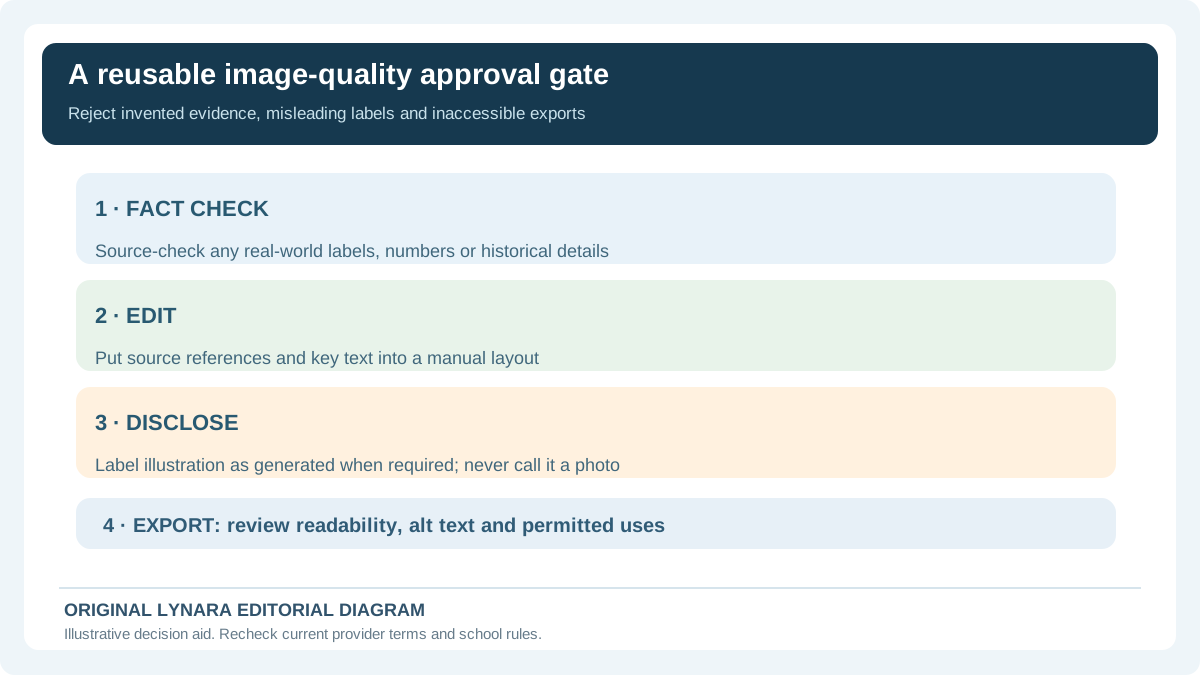
AI-created visuals are usually illustrations, not primary evidence. A generated microscopic image is not a microscope photograph from your experiment. An invented historical scene is not a contemporary document. An image purporting to show a specific scientific result cannot replace the chart or dataset that produced the result. These distinctions should be explicit in captions and oral presentations, particularly when realism might confuse the audience about what was observed and what was imagined.
For factual diagrams, start with a verified source and check all components yourself. If a supplied image includes real people, classmates, private records or copyrighted materials, consider whether you are authorized to upload it for editing. School accounts may have extra restrictions. A teacher may require disclosure of AI assistance or forbid it for part of the task; that policy outranks any general advice in this article. Keep the original prompt and source notes so you can explain the production process if asked.
Use generated visuals to support learning, not replace it
A picture can help memory when it highlights a meaningful relationship: cause and effect in a process, the sequence in a historical timeline, or the relationship between concepts in a revision sheet. But a decorative image that contains incorrect labels may damage understanding. One useful workflow is to draft the facts using class notes, decide what the picture is supposed to explain, generate only the illustration, and place verified text over it in an ordinary editor. That preserves control of definitions and spelling.
For study material, combine images with questions that require retrieval rather than recognition alone. After looking at an accurate labeled diagram, hide the labels and see whether you can name its parts from memory. Track which labels cause errors. Lynara's study tool hub can help organize revision, while the academic writing tools assist with presentation wording and planning. Neither a pretty picture nor an automated prompt is evidence that the material has been mastered.
Practical checklist and the limits of this comparison
Before choosing an image tool, establish the assignment rules, expected image type, required file format and whether the generated content may be submitted. Check whether the product supports your age, account and region. Try a small composition and an edit; evaluate accuracy, legibility and time spent correcting the result. Review the provider's current terms for privacy, permitted uses and attribution. Keep any necessary citations for underlying factual claims separate from a disclosure that the illustration was generated.
There is no universally best image generator for every student. The best option for a fictional cover image may be a poor choice for a technical diagram, while a layout editor might beat a specialized model for an editable poster. The tool market moves quickly, so verify current features from official sources rather than relying on an undated ranking. A responsible result is one that looks clear, communicates accurate information, and makes its origins understandable to the reader. This comparison is editorial guidance, not a hands-on performance test or a claim that any provider endorses Lynara.
Which image tool should you actually choose for a class project?
Begin with an assignment-specific choice rather than an unqualified 'best' ranking. A fictional literature poster might benefit from flexible art direction; a class slideshow may benefit more from a layout editor with readable, editable titles. A labeled science diagram raises a different risk: a convincing illustration is useless if a molecule, anatomical structure or measurement is wrong. When the drawing contains facts, create the verified outline and labels from course materials first, then decide whether AI image generation is even needed.
| School output | Tools to evaluate | Non-negotiable quality check |
|---|---|---|
| Illustrated cover with room for a title | ChatGPT Images or Gemini for conversational iteration; Midjourney for style exploration | Composition, school AI permission, title added as real editable text |
| Poster with source citations | Adobe or design-first editor alongside appropriately generated artwork | Actual source URLs, accessible typography and exported file inspection |
| Science revision diagram | Verified manual diagram first; an AI tool only for optional non-factual illustration | Every technical label and relationship checked against the lesson |
| Shared class-group slide deck | A legitimate collaboration editor with individual permissions | No shared private login, real team access, version and consent checks |
The providers' official documentation establishes some features, but it does not supply comparable independent measurements of label accuracy, editing precision, student learning or image ownership. Run only an assignment-permitted sample, record whether it meets your requirement, and do not convert one good example into a claim that a service is objectively superior for every student. Avoid a paid experiment if an existing permitted editor can produce the correct result.
Separate provider permissions, classroom rules and copyright
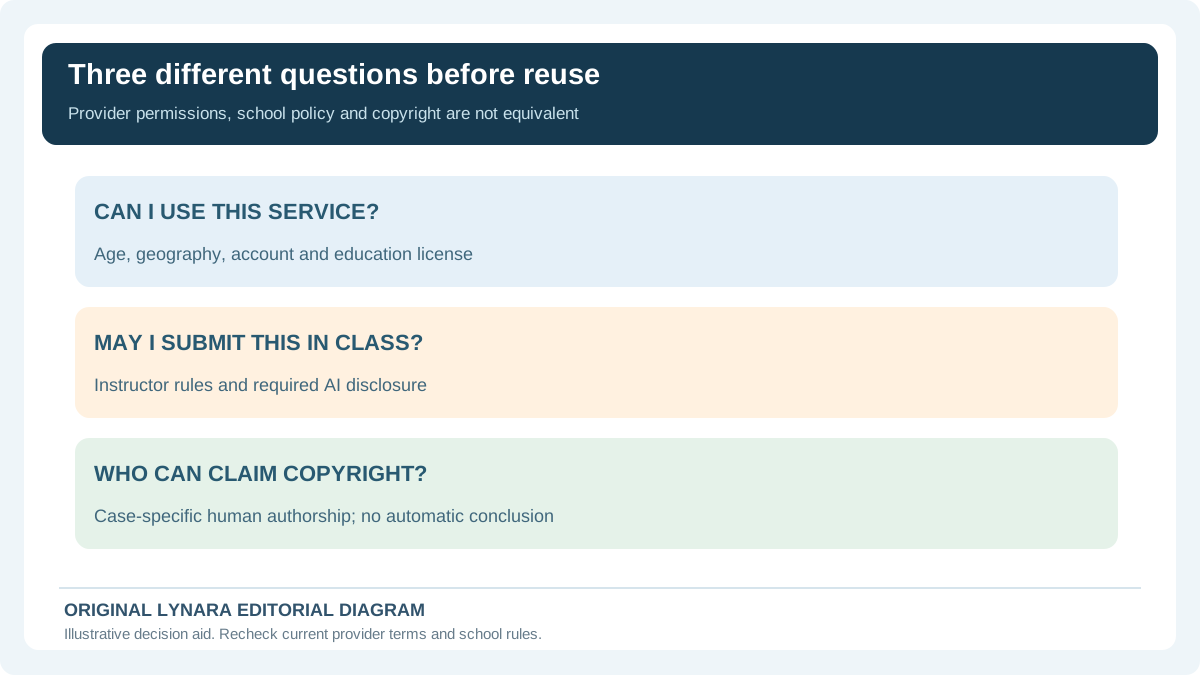
Three questions must be answered independently. First, can the student use a particular service with their actual age, location and account type? Google documents distinct conditions for creating versus editing images, while some providers require separately managed student subscriptions. Second, will the teacher accept a generated illustration as part of assessed work? An allowed commercial output does not override a teacher's requirement for original drawings or disclosure. Third, what legal rights, if any, attach to the output? Permission under a service's terms is not the same as copyright protection, nor does it erase third-party likeness, trademark or uploaded-photo concerns.
The U.S. Copyright Office's January 2025 report summary explains that copyright protection for AI-assisted works depends on sufficient human expressive authorship; merely issuing prompts is not automatically enough. The specific facts and jurisdiction matter. Adobe's documentation discusses permitted commercial uses for certain Firefly features, while its partner-model and credit terms may differ. Students should preserve their own editing contributions, follow provider requirements and ask qualified guidance for significant rights questions rather than claiming that every generated picture is either automatically owned or entirely free to copy.
Try one free, repeatable test and record the real result
Use a fictional classroom reading-corner cover, without any genuine student faces or private documents. Ask for a 16:9 landscape illustration with an empty title zone. Make one controlled change—alter only the background color—and inspect whether the location of important objects remains acceptable. Then export the result and insert a title in a conventional editor so that it remains actual text. Do not claim that the model followed the change perfectly until you have inspected both images yourself.
Log five observable criteria for your own result: readable composition, preservation during the edit, factual accuracy where applicable, ease of obtaining a usable export, and compliance with the class's AI policy. Mark each as PASS, REVISE or NOT TESTED rather than inventing a numerical image-quality score. No hands-on test results for these providers are reported here. If the work would require uploading classmates' faces, confidential assignments or copyrighted source images you cannot share, stop before entering the service. UNESCO's generative AI education guidance advocates age-appropriate, privacy-conscious validation. A good school workflow protects the students and supports the lesson, not just the appearance of the final slide.
Review and sources
Product feature descriptions were checked against the official sources linked above. The comparative classroom exercises are suggested methods, not experiments personally performed by the publisher. Provider offerings may change; consult the editorial policy and study guides.