How to Summarize PDFs With AI and Verify Study Notes
A reliable study summary is a map back to the source, not a substitute for reading the parts that matter. Here is how to keep the time savings without importing AI errors.
Know what the source document actually contains
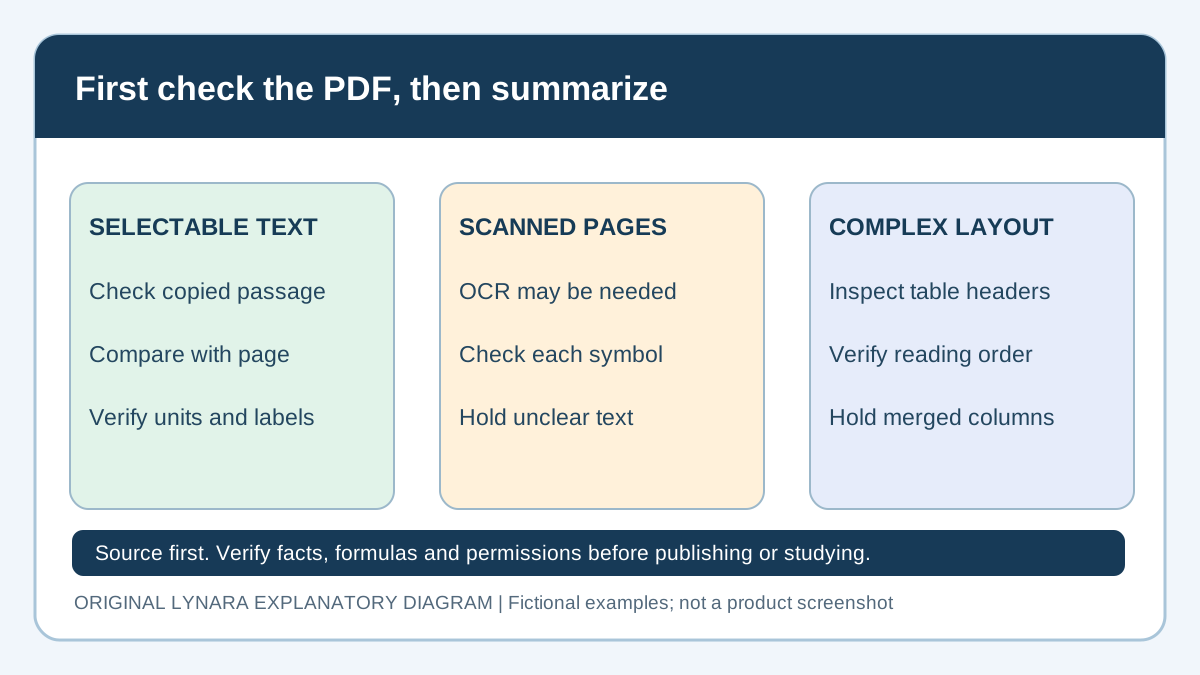
A PDF can be a digital textbook chapter, lecture slides, an uploaded handout, a scanned worksheet or a research article. These formats can look similar on screen but differ greatly in what an AI system can read. A scanned image may require optical character recognition; a complex table can be interpreted out of order; and a mathematical formula may be extracted with missing symbols. Before asking for a summary, inspect the document's structure and decide which pages or sections are relevant to the task. Do not upload a file simply because a tool accepts PDFs. Check whether the material belongs to you or whether its use is allowed, and remove private student or institution information that should not leave the approved learning environment. Work with the material the assignment actually requires. A summary of the wrong edition or an older revision can create confusing contradictions even when every sentence sounds plausible. Write down the source title, date and page range so later notes can be checked against the original.
A short prompt should have a clear boundary
Many low-quality summaries begin with a vague instruction: summarize everything important. The model then decides what important means, which might not match the instructor's learning objectives. Give a tighter request, such as identify the three mechanisms explained on pages four to seven, list the definitions exactly as stated and note any exceptions. If the document contains evidence for a conclusion, ask for the cited passage or page rather than a free-form paraphrase that loses its support. A useful structured output has a key idea, one- or two-sentence explanation, an example and a source location. That shape is not ideal for every discipline, but it makes checking possible. Tell the assistant to say when the answer is not supported by the document instead of filling gaps from memory. A missing citation is a prompt for investigation, not something to decorate with a plausible page number. Keep source details in notes so you can reopen the original when revision time comes.
Gemini Notebook and source-grounded study work
Google's current Gemini Notebook help describes PDF uploads, source-based chat and inline citations. The older NotebookLM help link redirects to this documentation. Its source import guide explains that some source types and synced Google Drive files behave differently, and comments or footnotes from Google files may not be imported. Features, limits and school-account access vary; check your current account rather than relying on an old tutorial.
Source-grounded does not mean source-perfect. Open the cited page and read the surrounding paragraph. A summary can omit a condition even when the citation points to a genuine document. Do not assume an uploaded class handout independently validates a scientific claim. If the assignment requires an external scientific source, inspect that source. For restricted files, obtain institutional permission before importing anything into a third-party account. A school-managed workspace and a personal account may have different data protections.
Make the summary shorter without removing the exceptions
A good revision note removes repetition but preserves the conditions that determine whether a rule applies. Consider a physics explanation that describes when a formula can be used and then lists an exception. A one-line summary that copies the formula but drops the condition may be actively harmful. The student might memorize a convenient expression and apply it to the wrong problem. Ask an AI assistant to identify assumptions, limitations and cases where the rule does not apply, then verify these against the source. If you have a dense textbook paragraph, an efficient reduction might preserve the definition, one worked example and a boundary condition. Compress descriptive prose, not essential reasoning. For an anatomy section, the labels and relationships may matter more than every adjective. For a history section, chronology and competing interpretations may be the important structure. Do not assume all subjects should be summarized into the same set of ten bullet points. The appropriate form follows the kind of knowledge being tested.
Inspect PDF extraction errors before trusting citations
Copy a short passage into a plain-text editor and compare it with the visible page. Does the text follow the right reading order? Are negative signs, superscripts, decimals, footnotes and column headers intact? A two-column article can be extracted across both columns, joining unrelated sentences. A table can lose its row labels and make a percentage appear to describe the wrong group. The W3C reading-order technique explains why logical PDF order matters for accessibility and meaning; it does not certify that an AI importer preserves that order.
For a scan, check whether searchable text exists. The W3C OCR technique describes how text recognition can make scanned material extractable. OCR can still confuse a digit with a letter, a minus sign with a dash or a superscript with an ordinary number. Compare important symbols with the page image. A PDF viewer's page index may also differ from a book's printed page number when a preface is included; record both when citations matter. If the scan is illegible, request a better authorized copy instead of guessing missing values.
Before summarizing, make a small source inventory: title, edition, page range, permission to upload, whether text selection works and which equations or tables require manual checking. Mark uncertain parts as HOLD. Do not let the model summarize a held formula as if it had been verified. These checks are particularly important when a PDF has been revised since the class assigned it.
A numerical example of summary-checking
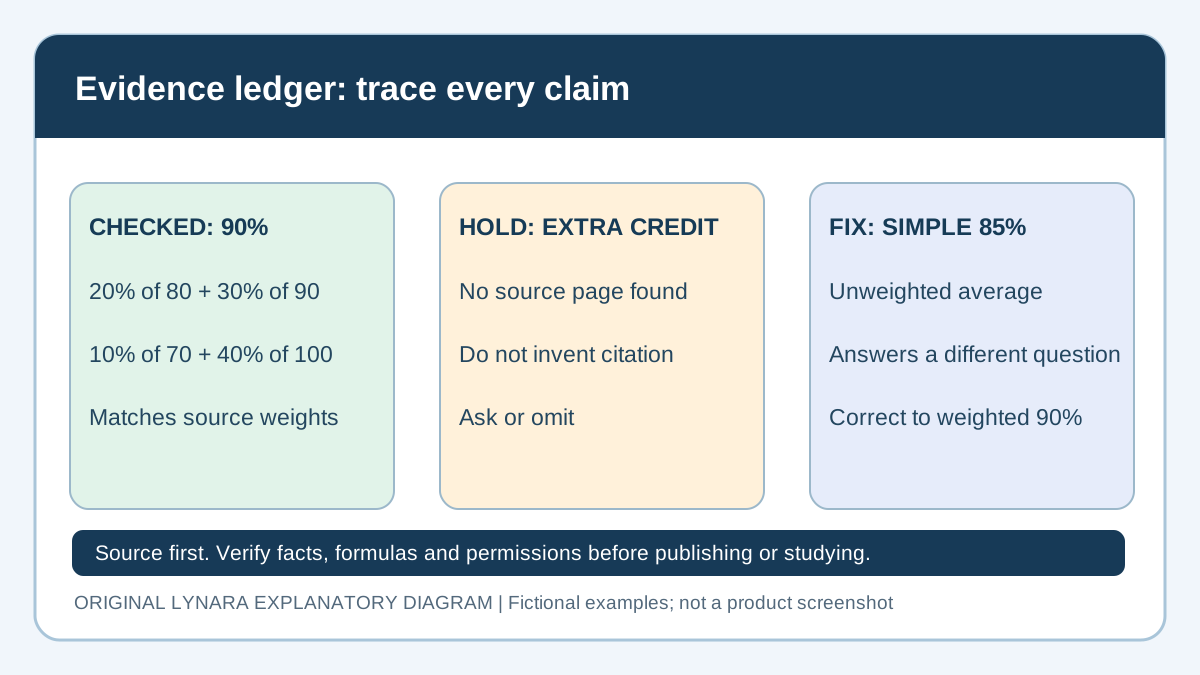
Suppose a note says that four assignment components have scores 80, 90, 70 and 100, with weights 20, 30, 10 and 40 percent respectively. A careless summary might claim the average is 85 because (80 + 90 + 70 + 100) divided by four equals 85. That would ignore the different weights. The actual weighted contribution is 0.20 × 80 + 0.30 × 90 + 0.10 × 70 + 0.40 × 100 = 16 + 27 + 7 + 40 = 90 percent. This is a useful reminder that shortening a source must not change its mathematical conditions. When a PDF table contains numerical weights, copy the values and labels carefully before asking the assistant to interpret them. Use the grade calculators to verify independent arithmetic. The same caution applies to units in scientific tables, sample sizes in statistics and dates in a historical timeline. A summary can be beautifully formatted and still wrong because it dropped one crucial number.
Use a claim-to-page ledger before exporting notes
Give each important statement its own row: draft claim, source title and edition, printed page, PDF page index if different, exact supporting passage or formula, and decision. Use CHECKED when the original directly supports the claim, FIX when the draft contradicts it, and HOLD when evidence is missing or extraction is unclear. In the fictional weighted-grade case, 90 percent is checked only after comparing all four weights and scores to the source. An assertion that extra credit is available stays on hold if no approved course document says so.
Never copy an invented page number into a bibliography. If a cited page does not contain the claim, search the original manually, find independent support or remove the sentence. The AI Claim Verification Tracker can help record manual decisions; it cannot authenticate a PDF or grant upload permission. Keep the original source and a short change log so you can revisit corrected notes after an instructor posts a new edition.
| Draft claim | Evidence | Decision |
|---|---|---|
| Weighted score is 90% | All four source scores and weights match. | CHECKED |
| Extra credit is available | No supporting page identified. | HOLD: ask or omit. |
| Simple mean of 85% is final grade | The course example specifies unequal weights. | FIX: use the weighted result. |
This ledger is a release control, not an accuracy score for the AI service. A single unsupported safety rule or examination policy may matter more than ten harmless wording mistakes. The goal is to catch consequential errors before they enter practice questions or assignments.
Convert notes into practice questions after checking them
Summaries are convenient to read but can create the illusion that recognition is memory. After checking the notes, turn the most important claims into questions that require retrieval. Replace a heading such as photosynthesis with a question about what enters and leaves the process, then try answering without looking. For a formula, give the variable definitions and a new numerical case. For history, ask why an event followed an earlier event rather than only recalling the year. AI can draft the questions quickly, but it may build them around its own erroneous summary. Inspect the answer key and remove any unsupported facts. Choose a mix of basic recall, explanation and application. The value of the question set is demonstrated when a student can solve it independently, not when the model generates hundreds of cards. Keep the questions connected to the course material and teacher's actual objectives. Our study tools can support the planning side while the student handles the answers.
One hour of study built around a checked summary
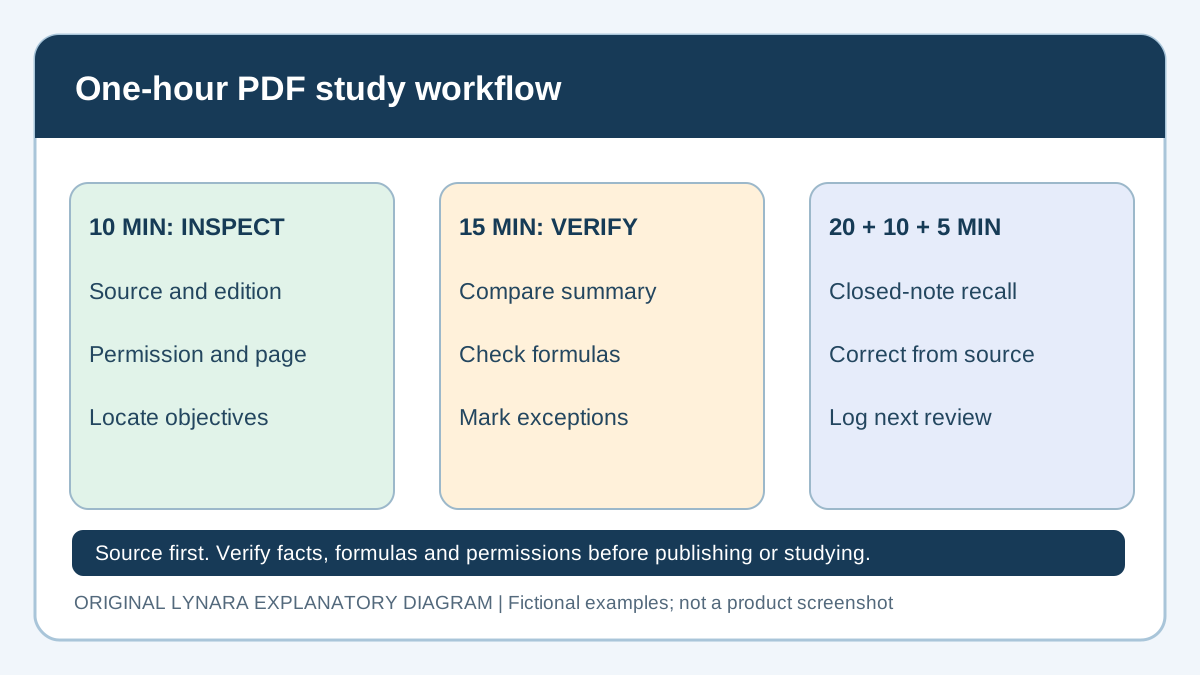
Consider a hypothetical sixty-minute session using a twelve-page reading. Allocate ten minutes to inspect learning objectives and identify the relevant sections, fifteen minutes to generate and verify a concise outline, twenty minutes to answer new questions without notes, ten minutes to correct mistakes against the original and five minutes to record what should be revisited. The total is 10 + 15 + 20 + 10 + 5 = 60 minutes. This structure is a teaching example, not a promise of equivalent learning for every subject. If the source is especially complex, fifteen minutes may not be enough to verify a summary, and the student should reduce the scope or extend the session. A rushed summary that creates wrong flashcards wastes more time later. Conversely, an easy reading might not need AI summarization at all. Measure benefit by the amount of genuinely useful practice and the reduction in confusion, not by the number of automatically generated pages. Time spent checking the source is part of completing the work correctly.
Citation, permission and privacy still apply
A PDF uploaded for private study may contain copyrighted material, personal details or confidential classroom information. Before uploading, review the relevant rights, institutional policy and service data practices. Avoid treating a school portal screenshot as harmless merely because it seems academic. Teachers and institutions may place restrictions on copying or processing assignments in external tools. A student's ability to access the document does not necessarily authorize redistributing it to every AI service. The U.S. Department of Education's classroom online-tool guidance advises school personnel to check institutional approval and student-data protections. This does not mean every personal AI upload is approved under FERPA. When preparing a report, cite the original textbook, article or authorized source—not the AI-generated summary as a substitute for an actual publication. Check the author's name, year, page and identifiers. Our citation tools can format known details but cannot confirm that a model's invented paper is real. If AI assistance must be disclosed, describe the tasks performed, such as outlining and generating practice questions, rather than falsely attributing independent research or experimental observations to the tool.
Choose the right fix when a PDF is unusable
If a file is restricted, stop before uploading it. Work from permitted notes or ask the instructor for an approved method. If a scan is unreadable, request a better copy or transcribe a short authorized passage and compare it line by line. If a multi-page table loses its labels, isolate a smaller section and verify every row header, denominator and unit. A longer prompt cannot repair missing evidence.
If an AI citation points to the wrong page, do not ask the model to invent a more plausible citation. Open the original and search for the proposition; leave it unresolved until located. If two editions disagree, use the edition required by the course and label the difference. These failures need different remedies: permissions require authorization, extraction requires better input, and factual conflicts require a source decision. Keep them separate so a polished summary does not hide an unresolved problem.
A final quality gate for AI study notes
Before trusting a generated summary, ask whether its source and edition are identified, all essential definitions match the original, numerical values and units survive correctly, exceptions remain visible and the answer can be traced back to the correct pages. Then ask whether the summary helps the learner do something: explain a relationship, solve a problem or retrieve facts independently. Notes that look shorter but leave the student unable to answer a practice question have not solved the underlying learning task. Save a small audit trail: original source, summary version, corrected items and a list of questions missed during practice. Revisit the missed material from the original instead of asking AI to paraphrase the same error repeatedly. This turns summarization into a reliable workflow rather than a production line for polished but untested notes. The aim is fewer administrative steps and stronger recall, without pretending that the model can replace the learner's judgment or the authority of the source material.
Editorial scope
The PDF-to-notes workflows above are demonstrations, not a measured accuracy comparison of specific providers. Check any generated summary against the original pages, particularly equations, tables, figure captions, citations and scanned text with recognition errors. Do not upload classmate details or restricted course files without permission. See Lynara's editorial policy for source and review standards.